30-60 Seconds to Tailor Resumes With AI for Germany, ATS Ready

Yes, AI can tailor your resume to a job description in about 30 to 60 seconds if you feed it a clean master profile and check the output before you send it. The real gain is precision: better keyword and semantic alignment with the job description, less guesswork about what a recruiter or applicant tracking system wants to see. The workflow below shows you how to do it properly, step by step.
TL;DR:
- AI resume tailoring primarily benefits from a comprehensive master profile, which ensures accurate rephrasing rather than fabricated experience.
- Layout and formatting are crucial for ATS parsing; simple, single-column PDFs with standard fonts and contact details in the body reduce failure risks.
- Replacing vague language with specific achievements and outcomes minimizes suspicion from recruiters and applicant tracking systems.
- Effective tools analyze full job descriptions using semantic matching, offering more relevant rewrites than basic keyword scans.
- Automation solutions like auto-apply agents can handle large-volume applications but require careful verification to maintain resume accuracy.
Table of Contents
- How Does AI Resume Tailoring Actually Work?
- What Is the Step-By-Step Workflow to Tailor a Resume With AI?
- What ATS Formatting Checks Should You Run After AI Rewrites?
- Can Employers Tell You Used AI to Write Your Resume?
- Which Tool Category Fits Your Job Search?
- How Do Popular AI Resume Tailoring Tools Compare?
- A Practical Take on Automating Your Job Search
- Let Appliqu Handle the Repetitive Part of Your Job Search
- Sources
- FAQ
How Does AI Resume Tailoring Actually Work?
An AI tailoring tool reads the entire job description, not just a scattered list of keywords. It identifies the required skills, the responsibilities the employer emphasizes, and the phrasing that repeats across the posting, then compares all of that against your existing resume or a master profile you've built.
From there, it suggests rewrites: reordered bullet points, adjusted phrasing, sometimes a reworked summary line. A properly grounded tool doesn't invent experience. It rephrases what you already did to match the employer's own language, because tailoring your resume to the job description is what puts your most relevant skills in front of a hiring manager who scans dozens of resumes per role.
Most tools also return a score of some kind: a fit percentage, a keyword match count, or a list of gaps between your resume and the posting. That score is a signal, not a verdict. Treat it as a checklist for what to fix, not proof the resume is ready to send. The full cycle, from pasting in a job description to getting a rewritten draft, typically takes under a minute, which is the entire point of using AI here instead of manually rewriting a resume five times a week.
What Is the Step-By-Step Workflow to Tailor a Resume With AI?
Skipping the prep step is the most common reason AI tailoring goes wrong. Build the foundation first, then let the tool do the fast part.
- Build one master resume. List every job, project, and achievement you have, with numbers attached wherever possible. This is the source document every tailored version pulls from, so it needs to be complete, not polished.
- Paste the job description in full. Don't summarize it or trim it down. The AI needs the whole posting, including the "nice to have" section, to catch phrasing your resume might be missing.
- Run the tailoring pass. This step usually takes under a minute. The tool will return a rewritten set of bullets and often a fit score.
- Review every changed line. Read each suggested bullet and ask if it's actually true. Cut anything vague, generic, or unsupported by your master resume.
- Check formatting and export. Confirm the layout still parses cleanly, then save as a text-based PDF.
- Save the version with the job title. A file named "Resume_CompanyName_Role.pdf" saves you from confusion in an interview three weeks later.
Steps one and two happen once and get reused. Steps three through six repeat for every application, and once you've done it a few times, the whole loop rarely takes more than three or four minutes per role.
Pro Tip: Keep a running log of which version you sent to which company, along with the date. When a recruiter calls back six weeks later asking about "the project management experience you mentioned," you'll know exactly which resume they read.
What ATS Formatting Checks Should You Run After AI Rewrites?
AI tools are good at language and weak at layout. A rewritten resume can read perfectly and still fail to parse if the formatting breaks the applicant tracking system reading it. Single-column templates with contact information placed in the body, not the header, improve parsing reliability across most major ATS platforms.
Run through this checklist every time before you submit:
- Use a single-column layout; two-column designs confuse most parsers.
- Stick to standard fonts: Calibri, Arial, Helvetica, or Times New Roman.
- Put your name, phone, and email in the body of the document, never in a header or footer.
- Use conventional section titles like "Work Experience" and "Education" instead of creative labels.
- Export as a text-based PDF rather than a scanned image or design file, since scanned files often return blank or garbled text.
Layout problems, not word choice, cause most parsing failures. Two-column designs, headers and footers, icons, and text boxes are frequent culprits, and they're also exactly the kind of design flourish an AI rewrite sometimes adds without warning. A quick fix is to strip the resume back to plain text, paste it into a fresh document, and rebuild the layout manually if the tool's export looks unusual. Our guide on ATS-friendly formatting covers this in more depth.
Can Employers Tell You Used AI to Write Your Resume?
Recruiters and applicant tracking systems don't scan for "AI fingerprints." They parse text and judge content, so what actually raises flags is generic, vague phrasing, the kind AI produces when it isn't grounded in your real experience.
That's why using your own detailed profile as the source material for AI rewrites matters more than the tool itself. Grounded AI rephrases what you did; it doesn't fabricate a project you never worked on. The risk of a hallucinated claim slipping through drops sharply when the model has your real achievements to draw from instead of guessing.
Before you submit anything, run this check:
- Read every bullet and ask: could I explain this in detail if asked in an interview?
- Replace vague phrases like "improved efficiency" with a specific number or outcome.
- Cut anything that sounds impressive but that you can't back up with a real example.
- Watch for repeated buzzwords across bullets; that's usually a sign the AI reached for filler.
For senior roles or achievements that don't fit a standard template, a human rewrite or a career consultant session often beats automation entirely. Nuance and negotiation history are hard for any tool to capture accurately. Our post on whether recruiters can tell you used AI goes deeper into this concern.
Pro Tip: Read your tailored resume out loud before sending it. If a sentence sounds like something you'd never actually say in an interview, rewrite it in your own words.
Which Tool Category Fits Your Job Search?
Three categories cover most of what's available: resume builders paired with ATS checkers, browser extensions that tailor on the fly as you browse listings, and full auto-apply agents that handle tailoring and submission together.
- Builders with ATS checkers suit people applying to a handful of roles who want control over every word.
- Browser-tailor extensions work well if you're already spending hours browsing job boards manually and want quick rewrites without leaving the page.
- Auto-apply agents make sense for high-volume applicants, career changers, or anyone applying to dozens of roles a week who wants tailoring and submission handled at scale.
Whichever category you choose, keep one master profile synced across every tool you use, and check privacy settings before enabling any auto-apply feature so you know exactly which job boards get your data. The safest workflow stays consistent regardless of tool: tailor, verify, save the version, then track the application.
How Do Popular AI Resume Tailoring Tools Compare?
The tools on the market split along a few practical lines: how much of the job description they actually read, how transparently they show their fit scoring, and how much manual work is left for you after the rewrite.
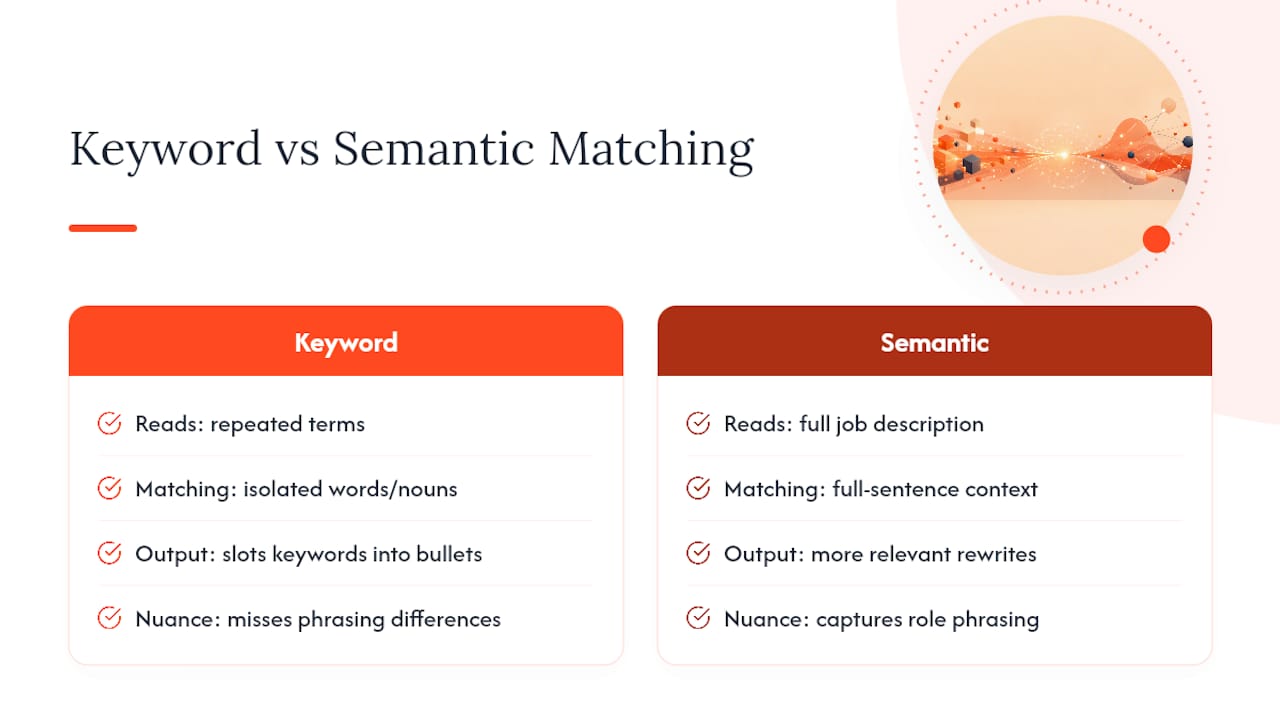
Basic keyword matchers scan a job posting for repeated terms and slot them into your existing bullets. That approach is fast but shallow. It catches obvious nouns like "SQL" or "project management" but misses phrasing nuance, like the difference between a posting that wants someone who "leads cross-functional teams" versus one that wants someone who simply "collaborates with other departments."
Semantic matching tools go further by reading the full context of a sentence rather than isolated words, which tends to produce more relevant rewrites than keyword stuffing alone. That's the approach behind Appliqu's semantic matching, which analyzes the entire job description rather than pulling out a keyword list, then applies that analysis across every application it tailors.
Some tools stop at tailoring and leave submission entirely to you. Others bundle tailoring with auto-apply, submitting to dozens or hundreds of job boards without you opening each one manually. The right choice depends on volume: a handful of applications a month favors a standalone builder, while a job search running into dozens of applications a week favors a tool that handles tailoring and submission together.
A Practical Take on Automating Your Job Search
The mistake I see most often isn't people using AI to tailor resumes. It's people trusting the output without reading it. Grounded tools that pull from your real profile, the kind behind Appliqu's semantic matching approach, rarely produce fabricated experience. What they can't do is know your career as well as you do. Automate the repetitive rewriting. Keep the verification step yours.
Alex
Let Appliqu Handle the Repetitive Part of Your Job Search
Appliqu is built for exactly the volume problem this article describes: applying to dozens of roles a week without spending your evenings rewriting the same resume over and over. It scans more than 100 job boards around the clock, matches postings against your profile using semantic analysis rather than a simple keyword scan, and generates a tailored resume and cover letter for each role before submitting the application for you.
If you're a career changer, a student applying to internships, or anyone short on time and long on job postings to get through, this is the category of tool built for that exact situation. The free plan lets you see how the tailoring and matching work; for subscription details, visit Appliqu's website, and the semantic matching approach behind Appliqu is documented in detail on the product page. Try the free plan and see how many relevant matches it surfaces in your first week.
Sources
FAQ
Is It Okay to Use AI to Tailor a Resume?
Yes, using AI to tailor a resume is widely accepted as long as the content stays accurate. The key is grounding the AI in your real experience rather than letting it invent achievements you can't back up.
Can Employers Detect AI-Written Resumes?
Employers and applicant tracking systems don't detect "AI" directly; they read text. What raises suspicion is generic, unspecific phrasing, so replacing vague claims with concrete numbers and outcomes reduces that risk significantly.
Is Claude Good for Resume Tailoring?
General-purpose AI models like Claude can rewrite resume bullets when given a job description and your background, but they lack built-in ATS formatting checks or fit scoring that dedicated resume tools provide.
Is There an AI That Can Write My Resume?
AI tools can draft and tailor resume content when fed your real work history, but the strongest results come from grounding the tool in a detailed master profile rather than asking it to generate a resume from scratch. Tools like Appliqu build tailored documents this way, pairing the rewrite with automatic submission across job boards.