Beat the Eight Second Scan: Avoid Job Application Mistakes in Germany

The most damaging job application mistakes are a two-column CV that breaks parsing, missing month-and-year dates, a generic cover letter that ignores the job description, unlisted attachments, duties written instead of results, typos, and ignoring the stated application instructions. Fix your format and dates first, then tailor your top three CV bullets to the job, then proofread twice. That single pass catches most of what gets an application binned before anyone reads past line one.
TL;DR:
- Ensuring full month and year dates are listed on your CV and explaining gaps prevents vagueness and damaging gaps.
- Using a single-column, text-based layout with standard fonts improves parsing success and avoids formatting errors that cause rejection.
- Customizing your top three CV bullets and your cover letter's opening line for each application significantly increases fit and reduces the risk of rejection.
- Avoiding passive language and outdated or unrelated work experience sharpens your message and highlights your most relevant achievements.
- Spending time verifying all attachments, following instructions, and reviewing formatting and content in a plain text view enhances the chances your application passes initial automated and human scans.
Table of Contents
- The most common job application mistakes and how to fix them fast
- CV formatting mistakes: layout, dates, achievements and length
- Cover letter mistakes: how to hook a recruiter in seconds
- Application form and attachment errors that quietly sink you
- What ATS software and recruiters actually look for
- The pre-send checklist that catches what you missed
- How Appliqu handles the fixes above
- Why skipping company research shows up in your application
- Passive language weakens even a strong CV
- Drop the work history that no longer serves you
- Match your cover letter to the company, not just the role
- The one habit worth prioritising above all others
- Let Appliqu handle the repetitive parts
- Sources
- FAQ
The most common job application mistakes and how to fix them fast
Recruiters do not read a CV top to bottom on first contact. They scan, and large-sample research into rejected applications shows fit mismatches and formatting problems dominate the rejection pile far more often than qualifications ever do. Here is the list, in the order most likely to cost you a look.
- Typos and grammar slips. A stray apostrophe rarely sinks you alone, but Indeed's own guidance on application errors notes that multiple mistakes, a wrong company name, or a misspelt contact name can be fatal on their own. Fix: read the document aloud, then hand it to someone else. Your eyes skip errors your ears catch.
- A generic CV and cover letter. Sending the same document to every employer signals you did not read the posting. Fix: rewrite your top three bullets and your opening line for each application, even if the rest stays fixed.
- Two-column or graphic-heavy CVs. Icons, sidebars, and tables scramble automated parsing and confuse a tired recruiter's eye. Fix: switch to a single-column, text-based layout.
- Missing month-and-year dates. A CV listing just years ("2021 to 2023") reads as vague or evasive. Fix: always give full month and year, and add a one-line note for any gap longer than a few months.
- Duties instead of results. "Responsible for social media" says nothing. Fix: rewrite as action, context, and a measurable outcome.
- Wrong length. Cramming fifteen years onto one page, or padding two pages of early-career filler, both backfire. Fix: match length to experience level, covered in detail below.
- Missing attachments. Forgetting the reference letter or certificate the posting explicitly asked for is an instant black mark. Fix: build a personal checklist of standard requested documents before you start.
- Ignoring instructions or deadlines. If a posting asks for a salary expectation in the subject line and you leave it out, some employers reject on principle. Fix: reread the posting once specifically hunting for instructions, separate from reading it for content.
- Unprofessional email addresses. An address like "partyboy1994@" undercuts every other effort you have made. Fix: use a plain firstname.lastname format, ideally on a modern provider.
- Not tailoring to the job description. This is the master mistake, because it causes most of the others. Fix: keep the job posting open while you edit, and mirror its actual language.
Pro Tip: If you only have twenty minutes before sending, spend it on the two fixes that affect parsing and first-glance impression: layout and dates. Everything else is refinement; those two are gatekeeping.
CV formatting mistakes: layout, dates, achievements and length
A CV has to survive two filters: a parsing system and a human doing a rapid scan. Both filters punish the same errors, which makes the fix list mercifully short.
- Use a single-column layout with standard section headings (Berufserfahrung, Ausbildung, Kenntnisse). Avoid text boxes, icons, and photos embedded as images, since broken two-column templates are one of the most frequently cited causes of application failure in the German market.
- Stick to standard fonts (Arial, Calibri, Georgia) and export as PDF, but open the exported file yourself to confirm nothing has shifted.
- Write dates as full month and year, consistently, throughout the document. A gap of several months or more deserves a short honest line rather than silence.
- Convert every duty-based bullet into an achievement using a simple formula: action verb, context, measurable result. "Reduced onboarding time by four days by rebuilding the training checklist" beats "Responsible for onboarding" every time.
- Length: one page for early-career applicants, two pages once you have a genuine track record to show. Longer than two pages rarely earns you anything, whatever your seniority.
Pro Tip: Test your finished CV by opening it in a plain text editor. If the sections still make sense in that stripped-down view, most parsers will read it correctly too. A tool built specifically for this, like Appliqu's guide to ATS-friendly CVs, walks through the export checks in more depth.
Cover letter mistakes: how to hook a recruiter in seconds
Hiring staff scan cover letters fast. Research into opening-line habits finds recruiters typically spend around eight seconds deciding whether an opening earns a proper read, which means "I am writing to apply for the position of..." is already a wasted sentence.
- Open with something concrete: a specific achievement, a direct observation about the role, or a genuine reason the posting caught your attention. Never the stock formula.
- Keep it short and targeted across a few brief paragraphs. Nobody needs your career history restated; that is what the CV is for.
- Reference one specific company fact, product, or need, so the letter could not have been sent to anyone else.
- Close with a confident, brief call to action rather than a passive "I look forward to hearing from you."
- Reread for AI-typical phrasing (repeated sentence structures, oddly formal transitions) and rewrite anything that does not sound like you actually said it.
Appliqu's guide comparing AI cover letter generators against fully automated agents covers where automation genuinely helps and where a human pass still matters, alongside worked cover letter examples built around real job postings.
Application form and attachment errors that quietly sink you
Online portals introduce a second layer of failure points that have nothing to do with your writing.
- Name every file clearly, for example "CV_JaneDoe.pdf", and confirm the requested file type and size before uploading. If a portal specifies PDF, do not submit an editable Word document.
- Double-check any copy-pasted fields, since dates and job titles pasted from one form into another frequently shift or truncate.
- Fill every required field completely, even ones that feel repetitive of your attached CV. Portals often ignore attachments if the form fields are incomplete.
- Note how the portal behaves: does it save drafts automatically, does it log you out after a period of inactivity, and does it send a confirmation email you can screenshot as proof of submission.
- Watch deadlines against the employer's own time zone, not yours, particularly for international applications.
What ATS software and recruiters actually look for
Parser-safe formatting matters, but not for the mythical reasons often repeated online. Single-column text with standard headings parses cleanly because it maps predictably onto data fields, not because of some secret keyword algorithm.
- Place keywords from the job posting naturally in your experience bullets and skills section, never stuffed into invisible white text or a dense list.
- Volume, not automated rejection, is the bigger obstacle: large-sample rejection data suggests human reviewers moving fast through hundreds of applications reject on fit and clarity far more than any parser does.
- Clear hierarchy and quantified results help with both filters at once, since a scanning human and a scanning parser are both hunting for the same signal: relevant, specific, easy to find.
- Test your own CV by pasting it into a plain text field. If your job titles and dates still read correctly, you are in reasonable shape.
The pre-send checklist that catches what you missed
- Confirm the recipient's name, company name, and job title spelling.
- Check every attachment is present and correctly named.
- Verify dates are consistent across CV, cover letter, and any form fields.
- Export to PDF and open the file to check formatting held.
- Run a spellcheck, then read the whole document aloud once.
- Give yourself a genuine six-second scan, as if you were the recruiter.
- Ask someone else to give it a second-eye check before you send.
If you spot an error after sending, a short, polite follow-up email with the corrected document attached rescues most situations, particularly for minor slips.
Pro Tip: Keep one canonical CV and cover letter, then build two or three tailored variants for the role families you actually apply to. Rebuilding from scratch every time is where most people's proofreading standards slip.
How Appliqu handles the fixes above
Appliqu reads the full job posting rather than just matching keywords, using semantic matching to judge fit against your profile before it drafts anything. It scans many job boards around the clock and tailors a CV and cover letter for each specific role, which directly targets the tailoring and formatting mistakes covered above.
- Appliqu exports documents in clean, parser-safe formats, addressing the layout errors that break automated scanning.
- Appliqu handles attachments automatically per application, reducing the file-naming and missing-document slip-ups covered in the attachments section.
- Two sending modes are available: on approval, where you review each application before it goes out, and Autopilot, where sending happens without per-application review.
- Explorer is a permanent free tier where Appliqu writes 5 applications. Sending starts with the Core plan.
Whichever mode you use, review the personalised drafts yourself before relying on them, since tailoring quality still benefits from a human glance.
Why skipping company research shows up in your application
Neglecting to research the company beforehand is one of the fastest ways to produce a generic application, even when your CV and cover letter are otherwise well written. It shows up in small, specific tells: a cover letter that could apply to any employer in the sector, a failure to mention the product or service the company actually offers, or interview-style questions in a written application that a five-minute search would have already answered.
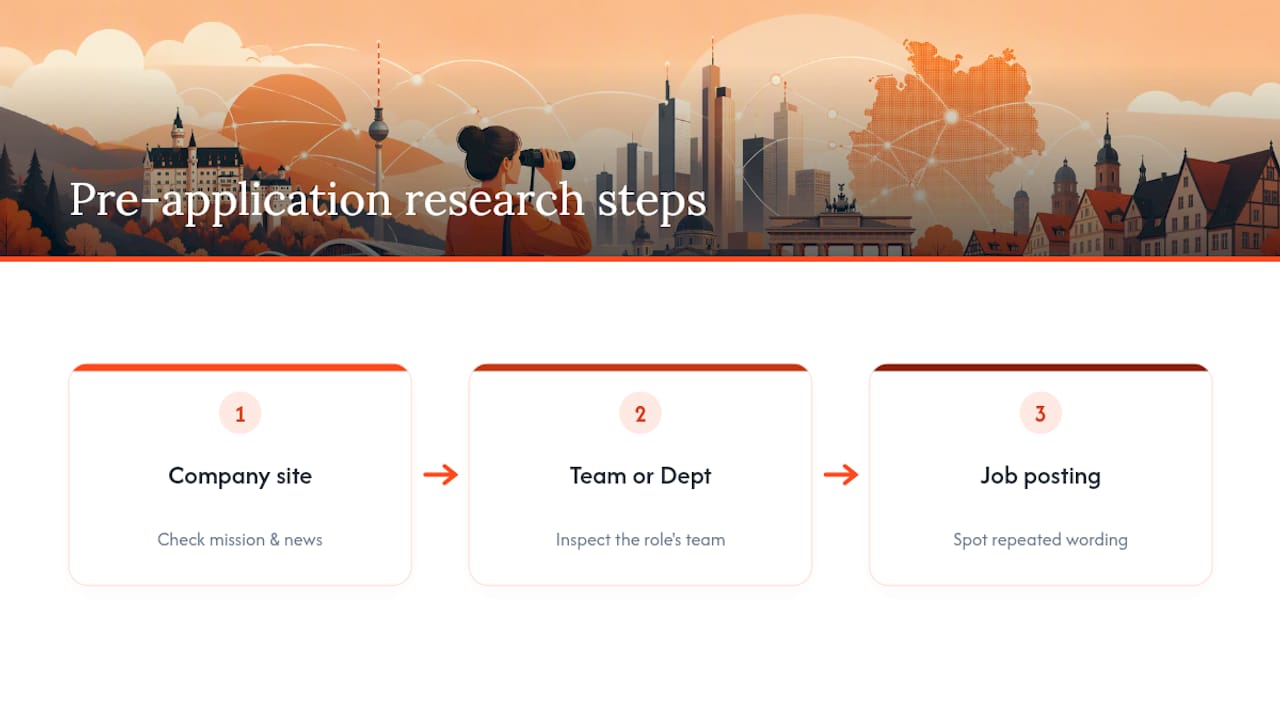
Spend ten minutes before you write anything. Check the company's own website for its stated mission or recent news, look at the specific team or department the role sits in if that is listed, and note anything distinctive about how the job posting itself is worded. Employers frequently signal their priorities directly in the posting; a phrase repeated twice in a job advert is rarely accidental.
This research does not need to appear as a history lesson in your cover letter. One well-placed, specific detail, a reference to a product line, a recent milestone, or a stated company value that matches something in your own experience, does more work than three paragraphs of generic enthusiasm. It proves you chose this employer deliberately rather than applying everywhere at once, which is exactly the distinction a tired recruiter is scanning for.
Passive language weakens even a strong CV
Passive constructions bury the person who did the work.
The fix is mechanical once you notice the pattern: hunt for phrases built around "was," "were," or "responsible for," and rewrite them with a strong action verb doing the work instead. "Was responsible for managing a team of six" becomes "Led a team of six through a systems migration." The second version is shorter, more specific, and reads with far more confidence.
This matters just as much in cover letters as in CVs. "It is felt that my experience would be relevant" reads as hedged and uncertain. "My experience in X makes me a strong fit for Y" states the same claim directly. Active language is not about sounding aggressive; it is about making sure every sentence clearly credits you with the action and the outcome, rather than describing events as things that simply happened around you.
Drop the work history that no longer serves you
Listing outdated or unrelated work experience dilutes a CV rather than strengthening it. A role from twelve years ago in an unrelated field, or a summer job listed purely to fill space, pushes your genuinely relevant experience further down the page, past the point where a fast scanner is still paying full attention.
Relevance matters more than completeness. If you are applying for a marketing role, three lines on a retail job from a decade ago rarely earns its place, unless it demonstrates a transferable skill you genuinely need to prove, like customer handling under pressure. Where older experience is worth keeping, compress it into a single summary line rather than the full bullet-point treatment you give recent roles.

The same logic applies to skills sections. Listing software you have not touched in eight years, or certifications that have since lapsed, invites a question you would rather not answer in an interview. If it is not current and not directly relevant to the role, either update it or leave it out. A shorter CV built entirely from relevant material consistently beats a longer one padded with history that no longer describes who you are professionally.
Match your cover letter to the company, not just the role
A cover letter tailored to the job title but not the company culture still reads as generic, even when the technical content is accurate. A formal, buttoned-up letter sent to a startup that markets itself as informal and fast-moving creates a small but real mismatch between what you wrote and what the employer is actually looking for.
Read how the company describes itself, not just what it does. A job posting that uses phrases like "we move fast" or "collaborative, flat structure" is signalling something about tone, not just process. Mirroring that register, without overdoing it, shows you read the posting properly rather than adapting a template. Conversely, a formal institution or public-sector employer expects a correspondingly formal register, and an overly casual letter there reads as a misjudgement rather than personality.
Role fit matters just as much as tone fit. A cover letter that talks generally about "wanting to grow" says nothing about why this specific role, at this specific company, makes sense for you now. Naming the actual responsibilities listed in the posting, and connecting them to something concrete from your own background, does more to prove fit than any amount of enthusiasm expressed in general terms.
The one habit worth prioritising above all others
If you tailor nothing else, tailor your top three CV bullets and your cover letter's opening line to each role family you apply to, then reuse that core narrative with small adjustments rather than rebuilding from scratch every time. Most rejected applications fail on fit and clarity, not on some hidden formatting rule, so spend your limited editing time where it actually moves the needle.
Pro Tip: Budget your effort deliberately: fifteen minutes of tailoring per application, applied consistently, beats one perfect application and nine generic ones. Use the pre-send checklist above as your baseline, then adjust for how much time each application genuinely warrants.
Alex
Let Appliqu handle the repetitive parts
Appliqu is the alternative to spending your evenings rewriting the same CV for the fortieth time. Rather than manually tailoring documents and refilling the same portal fields across dozens of job boards, Appliqu reads each job posting in full, matches it semantically against your profile, and drafts a tailored CV and cover letter for you, around the clock.
Explorer is a permanent free tier where Appliqu writes 5 applications, so you can see the tailored drafts before committing to anything. Sending itself starts with the Core plan at €29.90 per month for 100 applications. Pro, at €69.90 per month, covers 300 applications and adds the Appliqu Job Board. Concierge, at €199 per month, includes unlimited applications and a senior consultant session. All prices include 19% VAT. You choose between on approval mode, reviewing each application before it sends, or Autopilot, and it is worth reviewing personalised drafts yourself even in Autopilot to confirm tone and accuracy match what you'd write. Start with the Appliqu landing page to see current tiers and set up your Explorer account.
Sources
- 7 Fehler, die deine Bewerbung scheitern lassen | TalentVP
- 13 Cover Letter Mistakes Recruiters Spot in 8 Seconds (2026)
- Top 10 reasons resumes get rejected in 2026 | StylingCV
- Fehler in der Bewerbung | Indeed Karriere Guide
FAQ
What happens if you make a mistake on a job application?
A single minor typo is often forgiven, but multiple errors or a wrong company name can be fatal. If you catch it after sending, a brief follow-up email with the corrected document usually salvages the situation.
What is the 8-second rule for CVs?
Recruiters typically decide within seconds whether a CV or cover letter earns a proper read, so your top bullets and opening line need to state fit and results immediately rather than building up to them.
What are some common mistakes people make when applying for a job?
The most frequent errors are sending a generic, untailored CV and cover letter, using a two-column layout that breaks parsing, missing dates, listing duties instead of results, and ignoring the employer's stated instructions.
What are red flags on a CV?
Unexplained gaps without dates, duties listed with no measurable outcome, inconsistent formatting or fonts, and an unprofessional email address all read as red flags to a recruiter doing a fast scan.