Analyze Job Descriptions in 15-18 Minutes: Tailor CV with One Edit

Start by reading the posting once for the role's core outcomes, not the wording. Then extract the exact phrases that repeat, and map your top three priorities straight into your CV summary and first bullets. That single move, done properly, beats hours of generic tailoring. Appliqu can automate parts of this for you, but the framework below, plus a short toolkit and a pre-submit checklist, works whether you do it by hand or not.
TL;DR:
- Highlighting repeated terms and exact tool names is crucial, as these reflect true priorities that should be integrated into your CV.
- Precise placement of keywords-especially in the title, summary, skills block, and top role bullets-maximizes their effectiveness with ATS and recruiters.
- Analyzing a job posting thoroughly in 15 to 18 minutes involves skimming for scope, reading responsibilities twice, and mapping top terms to your CV without overhauling it.
- Red flags like vague requirements, role misalignment, or repeated listings signal roles that may be a poor fit or hard to fill, so quick validation is advised.
- Automation tools like Appliqu can scale semantic matching and tailored applications but still require human judgment for proof, tone, and accuracy before sending.
Table of Contents
- How do you analyse a job description properly?
- How do you find keywords in a job description?
- Where should matched keywords go on your CV?
- Why do ATS systems reject correctly worded CVs?
- What tools help you extract and track job description keywords?
- What are the red flags in a job description?
- What should you check before you submit an application?
- Treating a job posting like a client brief
- Appliqu: scale the analysis without losing the judgement calls
- Sources
- FAQ
How do you analyse a job description properly?
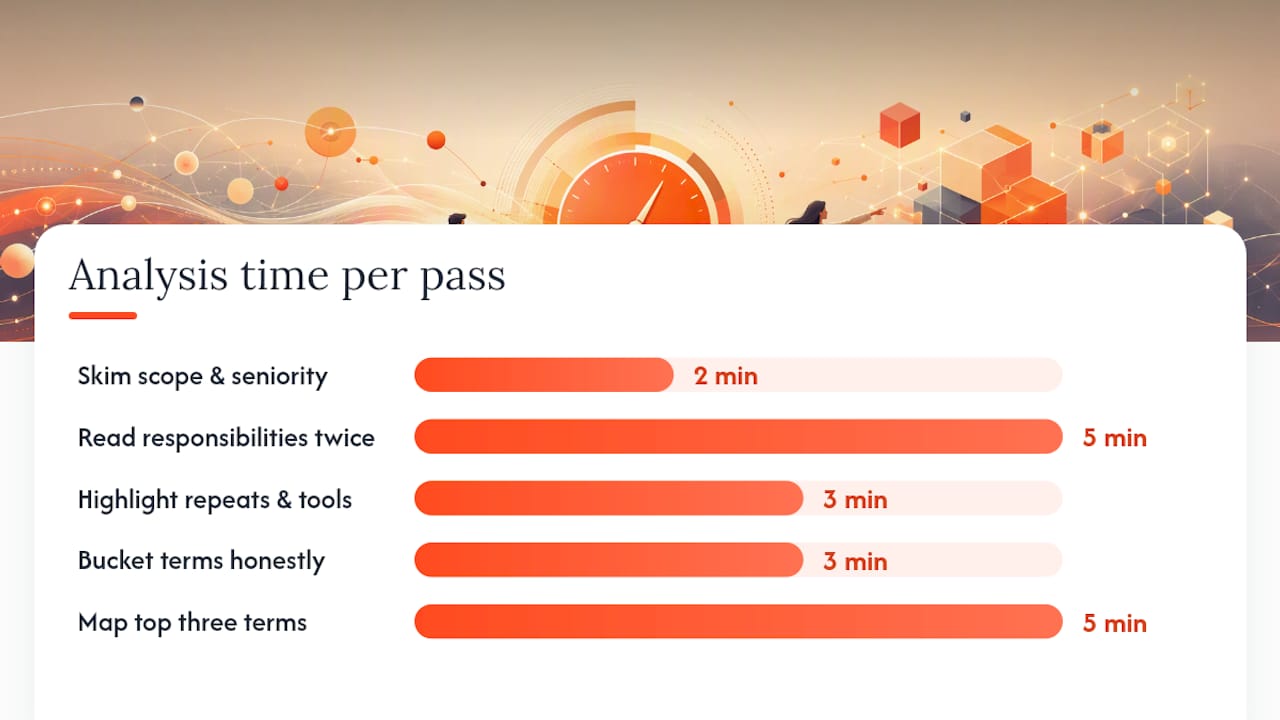
Most people skim a job description once and start rewriting their CV immediately. That's backwards. A proper job description analysis takes five short passes, and each one has a different job to do.
- Skim for scope and seniority (2 minutes). Read the title, the reporting line, and the first paragraph only. Work out whether this is an individual contributor role or a lead role dressed up with a junior title. Job titles lie more often than the rest of the posting.
- Read responsibilities and requirements twice (5 minutes). First pass for meaning, second pass with a pen or highlighter. You're looking for what the role actually does day to day versus what the company hopes someone might eventually do.
- Highlight repeats and tool names (3 minutes). Anything mentioned more than once, in the "Responsibilities" section and again in "Requirements", is a genuine priority, not filler. Exact tool names and version numbers go straight into your notes.
- Bucket every term into must, nice, or not true for you (3 minutes). Be honest about the third category. Claiming a skill you can't defend in an interview costs you more than a missing keyword ever will.
- Map the top three terms to your CV (5 minutes). This is where most of the value sits, and it's covered fully in the next section.
Give yourself a fixed budget of around 15 to 18 minutes per posting. If you're still undecided after that, the role probably isn't specific enough to reward more analysis.
The step that gets skipped most often is what's worth calling the "update one thing" loop: rewrite the summary line and the first bullet under your most relevant role, save it, then check it against the posting again before moving to the next section. Candidate-facing guidance on tailoring resumes consistently finds that a master CV with targeted summary and top-bullet edits produces most of the improvement in relevance, without you having to rewrite the whole document for every application. Editing everything gives diminishing returns fast. Editing the first 150 words gives you nearly all the benefit.
How do you find keywords in a job description?
Job description analysis lives or dies on precision. Vague paraphrasing ("strong communication skills") does nothing for an applicant tracking system or a recruiter scanning fast. What you need are exact tokens: tool names, version numbers, acronyms, title synonyms, and deliverable proof terms ("managed a £2m budget", "led a team of 12").
Capture four buckets as you read:
- Hard skills and tools: exact spelling matters. "Kubernetes" is not "container orchestration" to most parsers, and enterprise systems still rely on literal matching for named tools, so write the term the posting uses, not your own paraphrase.
- Soft or transversal skills: these hide in verbs like "collaborate", "influence", or "manage stakeholders" rather than a neat skills list. Research combining word-frequency analysis with feature-importance methods shows these indirect skill signals can be extracted systematically rather than guessed at.
- Title and function synonyms: "Growth Marketer", "Performance Marketer", and "Digital Marketing Manager" often describe the same job. Note every variant used across the posting.
- Proof and deliverable language: numbers, scale words ("enterprise", "SME", "Series B"), and outcome phrases ("reduced churn", "shipped on schedule").
For extraction itself, a simple word-frequency counter or even a copy-paste into a spreadsheet, one column per bucket, works for most people. If you're analysing several postings a week for the same target role, transformer-based models now outperform older keyword-matching methods at pulling relevant terms automatically, which is roughly what sits behind the semantic matching in tools like Appliqu.
Pro Tip: Keep a running spreadsheet with columns for "term", "bucket", "seen in how many postings", and "on my CV yes/no". After ten postings for the same role type, the must-have list becomes obvious.
Where should matched keywords go on your CV?
Placement decides whether a keyword actually registers with a parser or a recruiter's eye. Dropping the right term in the wrong place is nearly as wasteful as missing it entirely.
- Title line: match the posting's job title or its closest honest synonym here, not your last employer's internal title.
- First sentence of your summary: this is the highest-value real estate on the page. Your top one or two priority terms belong here, in a sentence a human would actually say out loud.
- Skills block: list tools and hard skills exactly as spelled in the posting. This section exists partly for parsers, so resist the urge to be clever with phrasing.
- First bullet under your most recent or most relevant role: this is where proof lives. A term without evidence behind it reads as padding to both software and people.
A workable minimal tailoring plan looks like this: rewrite your summary, adjust the first bullet under your top two or three most relevant roles, and leave the rest of your master CV untouched. Step-by-step candidate guides back this exact approach, mapping must-have terms into the title, summary, skills block and top bullets rather than scattering them across the whole document.
Every claimed keyword needs a proof term sitting next to it. "Project management" alone is an assertion. "Project management (delivered 14 releases across three teams in 2025)" is evidence. If you can't attach a number, a scope, or a named tool to a skill, question whether it belongs in your first bullet at all.
Pro Tip: If a term appears in both the "Responsibilities" and "Requirements" sections of the posting, it earns a place in your summary. If it only appears once, in a long "nice to have" list, the skills block is enough.
Why do ATS systems reject correctly worded CVs?
Applicant tracking systems vary enormously by vendor tier, and that variability is exactly why a technically correct CV sometimes still gets filtered out. Cheaper or older parsers still struggle with layout choices that look fine to a human eye but confuse a machine reading order.
Avoid these formatting choices entirely:
- Tables and multi-column layouts, which many parsers read left to right across columns rather than down each one, scrambling your work history.
- Text boxes and embedded images carrying job titles, dates, or skills. Parsers frequently skip these entirely.
- Headers and footers holding contact details. Some systems never read them.
- Unusual fonts, icons standing in for section headings, and heavy use of tables for skills grids.
- Non-standard section names. "Where I've Been" might read well to a person; "Work Experience" reads reliably to a machine.
Save your CV as a standard .docx or a text-based PDF, never an image-based export. Run a quick parse check before you submit anything: copy your CV text into a plain text editor and see whether the section order and content still make sense stripped of formatting. If your dates, job titles, and skills come through cleanly in that plain-text version, most parsers will manage fine too.
A three-pass audit approach, checking for synonym clusters, inflated requirement lists, and formatting problems, is one of the more reliable ways to catch false rejections before they happen. A guide on making a CV genuinely ATS-friendly covers the format-specific pitfalls in more depth if you want a longer checklist.
What tools help you extract and track job description keywords?
You don't need to do every pass by hand, but the judgement calls, honesty about what you can prove, tone of the final summary, still need a person behind them. Automation should remove repetitive chores, not replace the two or three decisions that actually change your odds.
- Keyword extractors pull frequent terms and tool names out of a pasted job description automatically, saving the highlighting step.
- ATS checkers simulate how a parser reads your CV and flag formatting issues before a human ever sees the document.
- Frequency counters are the simplest option: paste the text, get a ranked word list, done in seconds.
- Application trackers log which postings you've analysed, what you tailored, and whether you heard back, useful once you're applying to more than a handful of roles.
- Bulk application services extend automation further, applying semantic matching across many postings rather than one at a time.
When choosing between them, check language and market support first. Many keyword tools are built around US-style resumes and Boolean ATS logic, which doesn't map cleanly onto European CV formats or hiring norms. Also check whether the tool exports your keyword lists, so you retain a record you can reuse for similar roles later.
This is roughly where Appliqu sits. It reads the full text of a posting rather than just scanning for repeated words, matching roles to your profile on meaning rather than exact phrase overlap. The free Explorer tier writes 5 applications so you can see how the semantic matching behaves on your own profile before deciding whether bulk automation suits your search. Every generated document stays editable, so the "update one thing" habit from earlier still applies even when a large share of the drafting is automated.
What are the red flags in a job description?
Some postings are worth your full 18 minutes. Others are worth 90 seconds and a decision to move on.
- Every single requirement phrased as a hard "must have", with no distinction between essential and preferred, often signals a template nobody edited for this specific role.
- Junior-level duties paired with a senior title, or vice versa, usually means the pay band and the actual work don't match.
- The same posting reappearing every few weeks for months can mean high turnover or a role that's proving hard to fill for reasons not stated.
- No salary range on a senior role, especially where local rules would normally require one, is worth a direct question before you invest hours in an application.
- A list demanding expertise across five unrelated frameworks or platforms usually means the company hasn't scoped the role properly yet.
Quick validation costs little: check how long the current or previous incumbent stayed on LinkedIn, search the exact job title plus company name to see if it's been reposted repeatedly, or send a short clarifying question to the recruiter before applying. If two or more red flags stack up, skip it. If just one appears and you have a referral or a strong personal interest, apply anyway, but keep expectations realistic.
What should you check before you submit an application?
Five checks, roughly one minute each, catch most avoidable mistakes.
- Confirm your top three keywords appear in your summary, not just buried in the skills block.
- Check your priority tools are listed exactly as spelled in the posting.
- Reread your first bullet under each recent role. Does it carry a number or a named outcome?
- Paste your CV into plain text and confirm the section order still reads sensibly.
- Ask yourself honestly whether every claimed skill would survive a follow-up question in an interview.
Keep a keyword bank per role type. Once you've analysed five or six similar postings, the must-have list stops changing much, and each new application gets faster.
Treating a job posting like a client brief
The habit that separates a fast, effective search from a slow one is small: update one section, test it against the posting, repeat. It's less exciting than a full rewrite, but it's what actually moves the needle. Automation, including what's described in Appliqu's approach to CV tailoring, can scale that loop across many postings, but it can't replace the judgement of deciding what to claim and how to prove it.
Alex
Appliqu: scale the analysis without losing the judgement calls
Everything above works whether you do it manually or not, but manually repeating it across dozens of postings a week is where most job searches stall. Appliqu reads the full text of each posting rather than matching on isolated keywords, then tailors your CV and cover letter around what that role actually asks for, while keeping every generated line editable before it goes anywhere.
The Explorer tier is free permanently and writes 5 applications, enough to test how the semantic matching performs against your own CV. Sending applications starts with Core at 29.90 EUR per month for 100 applications, including 19% VAT. Pro at 69.90 EUR per month covers 300 applications plus access to the Appliqu Job Board. Concierge at 199 EUR per month gives unlimited applications alongside a session with a senior consultant. Every plan runs in either "on approval" mode, where you sign off before anything sends, or Autopilot, where the sending happens automatically once your preferences are set. Compare the plans and start with Explorer on the Appliqu plans page.
Sources
Claims in this article draw on peer-reviewed keyword extraction research, ATS auditing guides, and practical CV tailoring resources, including studies on BERT-based keyword extraction, transversal skill identification, and the ATS keyword gap audit. For product context, see Appliqu's guide to ATS-friendly CVs.
- Keyword extraction from job descriptions using BERT-based models
- Identifying transversal skills from job advertisements and extracting relevant keywords
- How to identify keywords in a job description: step-by-step ATS guide
- How to analyse a job description and tailor your resume
- ATS keyword gap: how to audit job descriptions rejecting talent
FAQ
How do you analyse a job description?
Read it once for scope and seniority, then twice more for responsibilities and requirements, highlighting anything repeated. Bucket terms into must-have, nice-to-have, and not-true-for-you, then map the top three priorities into your CV summary and first bullets, following the step-by-step approach candidate guides recommend.
What are the five steps of job analysis?
A practical version runs: skim for scope and seniority, read requirements twice, highlight repeated terms and tool names, bucket everything by priority, then map the top terms onto your CV. Each step has a natural time limit of a few minutes, so the whole process fits inside roughly 15 to 18 minutes per posting.
What is JD and JS in HR?
JD stands for job description, the document outlining a role's duties and requirements. JS commonly refers to job specification, the more detailed profile of the skills, qualifications and experience a candidate needs, though usage varies between employers and the terms often overlap in practice.
What are the levels in a job title hierarchy?
Job title hierarchies vary by company and industry, so there's no single universal standard, though common tiers include entry-level or associate, mid-level or senior, lead or principal, manager, director, and executive. When a posting's title doesn't match the seniority implied by its duties, treat that mismatch as a signal worth investigating before applying.
Can automation like Appliqu replace manual job description analysis?
Automation can speed up repetitive extraction and application tasks, and Appliqu reads full postings semantically rather than matching isolated keywords. Judgement calls around honesty, proof, and tone still benefit from a human review before anything sends, which is why Appliqu keeps every generated document editable.