Application Tracking Job Seekers Will Use: 15 Min Weekly Routine

Use one central tracker and update it daily. For most job seekers, a spreadsheet is enough: capture company, role, job URL, date applied, CV version, status, and a next-action date the moment you apply. Appliqu subscribers get a head start, since Appliqu automates submissions and records live status updates natively, but you still benefit from a personal log to add context and notes.
TL;DR:
- Tracking only a few application statuses like applied, interview, or rejected is insufficient; a detailed update on follow-up actions is essential for progress visibility.
- Using a next-action date for each application turns the tracker into an active task list, helping you stay on top of follow-ups and avoid neglecting stalled opportunities.
- Automating status updates with email alerts or calendar reminders significantly reduces manual effort and enhances real-time pipeline awareness.
- A weekly fifteen-minute review, focusing on new applications, responses, and overdue follow-ups, keeps the tracking system effective during a long job search.
- Combining automation tools like Appliqu with a simple personal spreadsheet offers the best balance between efficiency and context preservation.
Table of Contents
- What to track: essential fields and a status vocabulary
- Quick setup: build a tracker in under 20 minutes
- Routines that keep your tracker live
- How Appliqu complements manual tracking for subscribers
- Making email and calendar do the tracking for you
- Privacy and data security when tracking applications
- Customising your tracker by industry or job type
- Automated status updates and alert methods
- Author perspective: simple rules for long searches
- Try Appliqu if manual tracking is taking over your search
- Practical guides and templates to consult next
- Sources
- FAQ
What to track: essential fields and a status vocabulary
Application tracking fails for one reason more than any other: people write down too little, too inconsistently, to answer the question they actually care about, which is "what happens next?" A workable tracker needs enough structure to answer that question at a glance, without becoming a chore.
The core columns, in order, are:
- Company and role (exact job title, since companies often rename similar postings)
- Job posting URL, saved as a PDF if the listing might disappear before you need to reread it
- Date applied
- CV version and cover letter version, named consistently
- Status, using a short fixed vocabulary rather than free text
- Last update and next action + date
- Contact (recruiter or hiring manager name, if known)
- Notes (referral source, salary discussed, anything you would forget in a fortnight)
Status fields work best when they come from a short, repeatable list rather than improvised phrasing. A practical vocabulary runs: Applied, Follow-up sent, Phone screen, Interview, Offer, Rejected, No response. Six or seven categories is plenty. More than that, and you'll spend more time deciding which label applies than actually applying for jobs.
Two fields do more work than they look like they should. CV version tracking lets you see, over dozens of applications, whether the tailored version aimed at product roles converts to phone screens more often than the generic one, an insight naming CV versions consistently makes visible over time that you would otherwise never notice. Grouping fields into role details, application materials, and outcomes rather than one long undifferentiated table also makes patterns easier to spot once you have thirty or forty rows.
The next-action date is the single most useful column in the entire sheet. Without it, a tracker becomes a diary of things you've already done. With it, it becomes a to-do list that tells you exactly when to follow up, and on what.
Quick setup: build a tracker in under 20 minutes
You don't need a template marketplace or a subscription to start. Google Sheets is the recommended starting point for most job seekers because it's shareable, free, and has zero learning curve.
- Open a new spreadsheet and freeze the header row.
- Add the ten columns above across the top: Company, Role, URL, Date Applied, CV Version, Cover Letter Version, Status, Last Update, Next Action + Date, Contact, Notes.
- Import your last 30 days of applications from memory, email confirmations, and your "Sent" folder. Don't try to reconstruct anything older; draw a line and start fresh.
- Name your CV versions clearly now, before you have ten files called "CV final v2 (1).pdf". Something like
CV_ProductManager_v1saves confusion later. - Set a next-action date for every open row, even if it's just "check in one week."
Pro Tip: Colour-code the status column using conditional formatting. Green for "moving forward," yellow for "waiting," red for "closed." You'll spot a stalled pipeline in under three seconds instead of reading forty rows.
For light automation without extra tools, set a recurring calendar reminder for each next-action date and use your browser's "save page as PDF" shortcut the moment you apply, before the listing gets pulled down. That's usually enough friction reduction for a solo job search.
A short weekly checklist keeps the whole thing honest: count new applications, mark any responses, flag anything past its follow-up date, and archive whatever's gone cold.
Routines that keep your tracker live
A tracker only earns its place if you touch it daily. The habit that matters most is small: update the row the moment you take an action, whether that's applying, sending a follow-up, or finishing an interview. Two or three minutes, done immediately, beats a "big catch-up" you keep postponing.
The weekly review is where the real value shows up. Set aside fifteen minutes, same day each week, and work through a fixed checklist. This is the core habit that turns a passive log into an active system, rather than a spreadsheet you fill in and never revisit.
Your weekly review should cover:
- New applications submitted since the last review
- Any responses or status changes to log
- Interviews scheduled or completed
- Follow-ups now overdue, based on next-action dates
- Applications with no movement, candidates for archiving
- Which CV version is generating the most responses
| Signal | Action |
|---|---|
| No response after one week (portal application) | Send a polite follow-up |
| No response after a referral, within 3-4 days | Follow up sooner than a cold application |
| No movement after a reasonable follow-up period | Mark closed/rejected, stop tracking actively |
| One CV version outperforming another | Standardise on the stronger version going forward |
There's no universal day-count for declaring an application dead, but the working rule is simple: once you've followed up and heard nothing further, move it to closed and stop spending attention on it. That single act of pruning is what keeps a tracker usable after week six of a search, when the row count would otherwise become overwhelming to scroll through.
How Appliqu complements manual tracking for subscribers
Appliqu removes most of the manual data entry that makes tracking tedious in the first place. Explorer is a permanent free tier, and within it, Appliqu writes five applications so you can see the output before deciding whether to send. Actual sending starts with Core at €29.90 per month for 100 applications. Pro, at €69.90 per month, raises that to 300 applications and adds the Appliqu Job Board. Concierge, at €199 per month, gives unlimited applications plus a session with a senior consultant. All prices include 19% VAT.
Two modes govern how Appliqu acts on your behalf: "on approval," where you sign off before anything goes out, and Autopilot, where Appliqu submits without waiting for your review each time.
Appliqu automatically stores:
- A record of every submitted application
- Timestamps for submission and any status changes
- Basic status updates as they become available
What Appliqu doesn't capture is the personal context that makes a tracker genuinely useful: your own notes on a recruiter conversation, the specific reasoning behind a tailored CV name, or observations from an interview that only make sense to you. Subscribers get the most out of both systems by treating Appliqu's live record as the factual backbone and layering a lightweight personal sheet on top for notes and next-action dates that Appliqu doesn't need to know about.
Making email and calendar do the tracking for you
Your inbox and calendar already contain most of the data your tracker needs. The trick is pulling it out consistently rather than re-typing it from memory a week later.
Set up an email filter or label for job-related correspondence the day you start searching. Anything from a recruiter, an applicant tracking system confirmation, or an interview scheduler gets tagged automatically, which means you're never hunting through a cluttered inbox to remember whether a company replied.
Calendar integration solves the follow-up problem specifically. The moment you log a next-action date in your tracker, create a matching calendar event, even a simple all-day reminder titled with the company name. This turns your calendar into a second, glance-only view of your pipeline, which matters on days when you don't have time to open the full spreadsheet.
Interview scheduling links (from tools like Calendly or a recruiter's own system) should go straight into your calendar with the job's row number or company name in the title, so you can cross-reference back to your tracker in one click. If you use Gmail or Outlook, forwarding rules that copy application confirmations into a dedicated folder mean you always have a paper trail if a company later claims you never applied.
None of this requires new software. It requires deciding, once, how your existing email and calendar will talk to your tracker, and then sticking to that decision for the length of your search.
Privacy and data security when tracking applications
Your tracker contains sensitive material: salary figures, personal contact details for hiring managers, and sometimes notes about interview questions or company internals shared informally. Treat it accordingly.
If you're using a shared spreadsheet tool, check the sharing settings before you start. A link set to "anyone with the link can edit" is convenient but means anyone who gets that link, forwarded, copied, or leaked, can see and change your data. Restrict access to yourself unless you deliberately want a mentor or career coach to view it.
Avoid storing full CV files with personal addresses or phone numbers inside a spreadsheet cell as plain text; link to the file in cloud storage instead, and make sure that storage location has its own access controls. The same applies to any offer letters or salary negotiation notes: keep them in a separate, permissions-controlled folder rather than pasted into a "Notes" column that might get exported or shared inadvertently.
If you're applying through Appliqu, your submission records live within the account's own security, separate from whatever local sheet you maintain. Keeping the two systems distinct is a reasonable habit anyway: your personal tracker should hold what you choose to record, and nothing more than that.
Delete or archive rows for closed applications periodically rather than letting years of personal data about former employers and contacts accumulate indefinitely in one file.
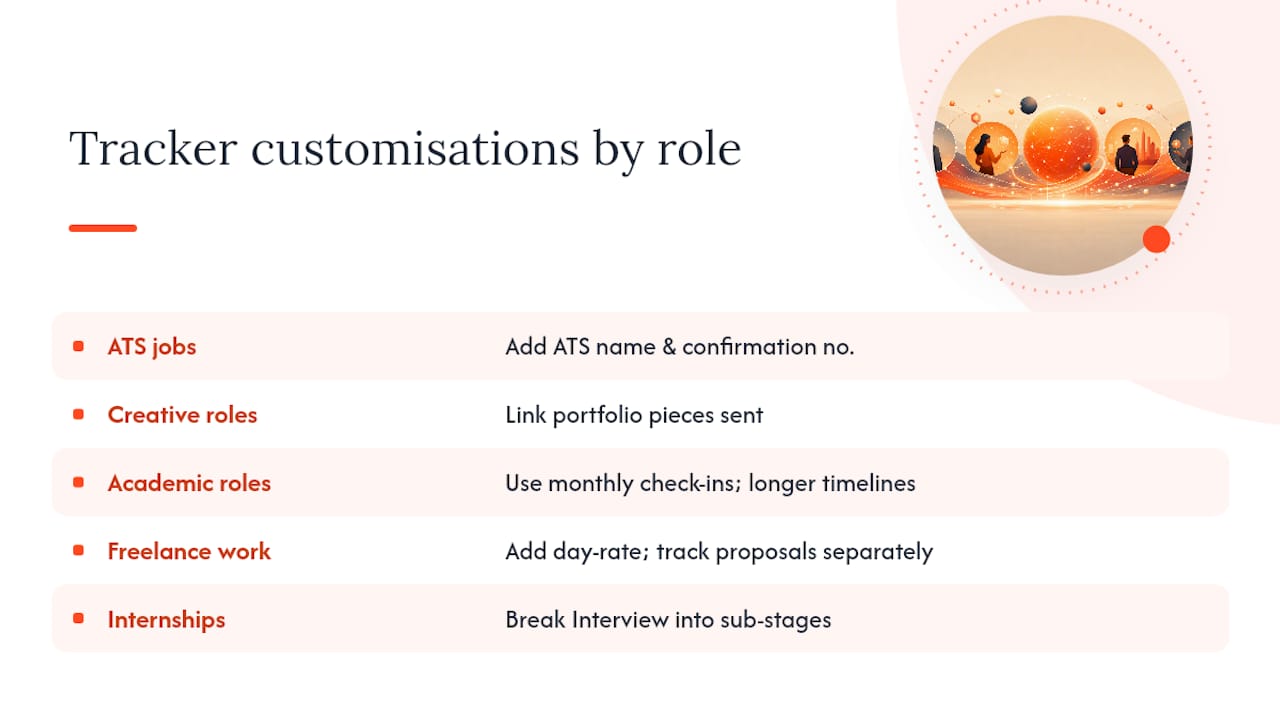
Customising your tracker by industry or job type
The ten-column template works as a baseline, but different job searches generate different bottlenecks, and your tracker should reflect that.
If you're applying to roles that go through a formal applicant tracking system (most large companies and public sector employers), add a column for the ATS platform name and confirmation number. These systems rarely send meaningful status updates, so your own record of "submitted, no visibility" is often the only evidence you have that an application went in at all.
Creative and portfolio-based roles (design, writing, video) benefit from an extra column linking to the specific portfolio pieces you sent for that application, since you'll often tailor which samples you send per employer.
Academic and research positions typically involve far longer timelines, sometimes months between application and any response. Widen your "next action" cadence accordingly. A weekly follow-up rhythm suited to corporate roles will read as impatient in academic hiring; monthly check-ins are more appropriate.
Freelance and contract work benefits from adding a day-rate or project-fee column and a separate status for "proposal sent" versus "application sent," since the two often run on different timelines within the same search.
Internship and graduate scheme applications often come with fixed deadlines and multiple assessment stages (online test, video interview, assessment centre). A single "Interview" status is too coarse here; break it into sub-stages so you can see exactly where in a multi-step process each application sits.
Automated status updates and alert methods
Manually refreshing an ATS portal to check whether your status changed is one of the least productive uses of a job search. A few low-effort methods reduce that checking without requiring new subscriptions.
Email notification settings are the first line of defence. Most applicant tracking systems send an automatic email on status change, even if it's a generic rejection. Make sure those emails aren't filtered into spam by whitelisting the sender domain the moment you apply.
Browser bookmarks or a dedicated folder for application portals let you do a fast weekly sweep across the systems that don't email reliably, rather than trying to remember which ten portals you need to check individually.
For higher application volumes, a purpose-built job application manager adds one-click capture from job boards, document versioning, a visual pipeline, and basic analytics, useful once a spreadsheet starts feeling like it's fighting you rather than helping you. These tools don't replace judgement about which roles to pursue; they reduce the data-entry overhead once volume rises past what a manual sheet can handle comfortably.
If you're applying through Appliqu, status updates arrive without any manual checking at all, since Appliqu tracks submissions and updates on your behalf as part of the service, in either "on approval" or Autopilot mode.
Author perspective: simple rules for long searches
The best tracking system is the one you'll still be updating in week eight, not the one with the most columns in week one. A basic spreadsheet you touch daily beats an elaborate dashboard you abandon after a fortnight, and that's not a compromise, it's the actual design goal.
Escalate to automation, whether that's a purpose-built tracker or Appliqu's automated applying, only once volume or multi-market complexity genuinely makes manual updates unreliable. Applying to five roles a week rarely needs software beyond a spreadsheet. Applying to fifty does.
A short resilience checklist helps during long searches: cap your weekly review at fifteen minutes so it never feels punishing, archive dead applications without ceremony, and resist adding a new column every time you think of one. Complexity creeps in one field at a time, and it's the single fastest way to make yourself stop using the thing you built to help you.
Alex
Try Appliqu if manual tracking is taking over your search
Appliqu handles the two parts of a job search that eat the most time: finding relevant roles across more than 100 job boards and submitting tailored applications against them, with live status tracking built in rather than bolted on afterwards. Explorer, the permanent free tier, lets Appliqu write five sample applications so you can judge the output before committing to anything. Sending begins with Core at €29.90 per month for 100 applications; Pro, at €69.90 per month, raises that to 300 and unlocks the Appliqu Job Board; Concierge, at €199 per month, gives unlimited applications and a session with a senior consultant. All prices are include 19% VAT.
Choose "on approval" mode if you want to review each application before it goes out, or Autopilot if you'd rather Appliqu submit without waiting on you each time. If you're still deciding whether your search needs a personal tracker, automated applying, or both, start with Explorer and see the output for yourself. When you're ready to send, upgrading to Core takes a few minutes on the Appliqu landing page.
Practical guides and templates to consult next
For a ready-made spreadsheet structure, ResumeKaraage's tracking guide lays out the minimal column set most job seekers need. For cadence and follow-up timing, Ardent Workshop's tracking guide covers the weekly review habit in more depth. For grouping fields to support later analysis, Resumed.online's tracker guide is worth a look.
Sources
- How to Track Job Applications Effectively | ResumeKaraage
- How to Track Your Job Applications Without Losing Your Mind. NextCV Blog
- Job search tracking guide | Ardent Workshop
- Kandid
- Resumed
FAQ
What's the minimum I need in a job application tracker?
Ten columns cover it: company, role, job URL, date applied, CV version, cover letter version, status, last update, next action plus date, and notes.
How often should I update my tracker?
Update it immediately after any action, applying, following up, or interviewing, rather than batching updates; a full weekly review then catches anything you missed.
When should I follow up after applying?
Usually about a week after applying through a portal is a reasonable time to follow up, or sooner if the application was via a referral.
When should I mark an application as closed?
Once you've followed up and heard nothing further, move it to closed so your active pipeline only shows opportunities still genuinely in motion.
Does Appliqu replace the need for my own tracker?
Appliqu automatically records submitted applications, timestamps, and status updates, but a personal tracker still holds context Appliqu doesn't capture, such as interview notes and your own CV version naming.
Is a spreadsheet enough, or do I need dedicated software?
A spreadsheet is sufficient for most job searches; a purpose-built application manager becomes worth considering only once volume or complexity makes manual updates unreliable.