Get 5 Free Drafts: Application Autofill for Job Seekers, Keep Final Approval

Application autofill pre-populates form fields with your profile data so you save time filling in the same details across job boards, but you should still review and tailor each application before it goes anywhere. Blind auto-apply, where a service submits on your behalf without your input, carries far more risk than most job seekers realise. Appliqu belongs firmly in the reviewed camp: it drafts applications for your approval, and only moves to unattended sending once you explicitly choose Autopilot mode.
TL;DR:
- Autofill tools improve efficiency but require careful review to avoid mismatched or generic application details that can harm your chances.
- Using autofill for standard fields like work history and contact info is safe, but always verify salary expectations and personalized responses before submitting.
- Proper CV formatting, including selectable text and standard headings, is essential for accurate data extraction by ATS and autofill systems.
- Cloud-based autofill services pose higher privacy risks and detection chances, so prefer tools that store profiles locally or clearly disclose data handling.
- Choose autofill solutions with explicit review options, transparent operations, and support for the job platforms most relevant to your application strategy.
Table of Contents
- What is application autofill and how does it differ from auto-apply?
- How do you use autofill safely and efficiently?
- Does your CV format affect how autofill and ATS systems read it?
- What are the privacy and detection risks of autofill tools?
- How do you choose the right autofill solution?
- What are the common challenges and limitations of autofill tools?
- How do popular autofill tools compare on features?
- Best practices for customising autofill settings by application type
- What impact do autofill tools have on productivity and outcomes?
- Publisher perspective: Appliqu's responsible approach to autofill
- How Appliqu helps you autofill securely and get started
- Sources
- FAQ
What is application autofill and how does it differ from auto-apply?
Application autofill reads the fields on a job application form, then matches each one to the corresponding piece of data in your profile: name, address, work history, education, and answers to standard eligibility questions. This is field mapping, and it is the mechanical core of every autofill extension or tool on the market. Get the mapping wrong and you end up with your previous job title sitting in the "notice period" box.
There are two ways this happens technically, and the distinction matters for both speed and privacy:
- Browser-extension autofill runs locally on your device, using your own IP address, and typically fills fields at roughly the speed a human would type them.
- Cloud-based submission runs the process on a remote server, often at data-centre IP addresses, and can submit far faster than any person could manage by hand.
The critical distinction is this: autofill pre-populates the form and waits for you to hit submit, while auto-apply tools submit on your behalf without a final human check. That difference decides whether a stray mismatched field gets caught before a recruiter sees it, or after.
How do you use autofill safely and efficiently?
Speed only helps if what gets submitted is accurate and tailored. A sound workflow treats autofill as a first draft, not a final answer.
- Build a complete profile once, covering full work history, education, certifications, and standard eligibility answers (right to work, notice period, salary expectations), and keep it current after every job change.
- Turn on autofill for the fields that rarely change, but treat every submission as a draft until you have read it.
- Rewrite role-specific narrative questions ("Why do you want this role?") by hand or with AI assistance tuned to that specific posting; generic answers are the easiest thing for a hiring manager to spot.
- Double-check salary expectations, notice period, and location or relocation questions every time, since autofill tends to carry over defaults that may not suit the specific role.
- Skip autofill entirely for applications with heavily bespoke question sets, such as graduate schemes with written assessments, where manual answers add real value.
Pro Tip: Keep a short "watch list" of the three fields most likely to trip you up (usually salary, notice period, and the free-text motivation question) and check those three before anything else, every single time.
This is essentially what an on-approval autofill workflow is designed to protect: the time savings of automation with a human check retained at the point that matters most, right before submission.
Does your CV format affect how autofill and ATS systems read it?
Yes, and the mechanism is the same for both. Applicant tracking systems parse a CV through three stages: text extraction, field mapping into a structured profile, and then recruiter review of that structured summary. Autofill tools follow an almost identical path when they pull data from your uploaded CV to populate a form. If the extraction step fails, everything downstream is wrong.
A handful of formatting choices determine whether extraction succeeds:
- Use selectable, machine-readable text; never a scanned image or a CV built entirely from graphics.
- Stick to standard section headings such as "Experience," "Education," and "Skills" rather than creative labels an ATS won't recognise.
- Keep dates in a consistent format throughout, ideally month and year for every entry.
- Avoid true table cells for layout, since some parsers read across columns rather than down them, scrambling your reading order.
- Save as PDF or DOCX with text that remains selectable, not a flattened export.
The reading order matters more than whether you use one column or two. Research on ATS parsing shows that a well-constructed two-column CV can parse just as reliably as a single-column layout, provided the underlying text order flows logically when extracted. Layout panic is often misplaced; structural consistency is what actually counts.
One more habit pays off regardless of format: tailor the CV content itself to each job description rather than sending an identical document everywhere. A tool like Appliqu's CV tailoring feature can help align wording to a specific posting without you rewriting the whole document from scratch.
What are the privacy and detection risks of autofill tools?
High-velocity automation attracts attention, and not the kind you want. Platforms such as LinkedIn and many large ATS providers actively watch for submission patterns that look automated: identical timing, data-centre IP ranges, or dozens of applications landing within minutes. Cloud-based auto-apply services are more likely to trigger CAPTCHAs or account flags than browser tools running at your own pace from your own connection.
Beyond detection, there's the question of what happens to your personal data once it sits inside a third-party system. A few checks are worth making before you hand over your CV and contact details:
- Prefer tools that store your profile locally on your device rather than uploading it to an unspecified cloud server.
- Read the privacy policy specifically for how long data is retained and whether it's shared with third parties.
- Watch for fake job postings designed purely to harvest applicant data, particularly ones with vague company details and generic email domains.
- Be wary of any tool that asks for banking details or payment information as part of an "application process."
Browser-based extensions that keep profile data on your own device offer a clear privacy advantage over services that route everything through a remote server, simply because there's one less party holding your data.
How do you choose the right autofill solution?
A short checklist separates tools worth paying for from ones that create more risk than they remove.
- On-approval by default. You should be able to see and edit every field before anything is sent, with unattended sending as an explicit opt-in rather than the standard behaviour.
- Local or transparent operation. Either the tool runs from your browser, or the vendor documents exactly how and where your data is processed.
- A clear, specific privacy policy. Vague language about "improving services" is a red flag; look for concrete retention and sharing terms.
- Documented ATS coverage. Vendors should state which platforms they support rather than making blanket claims of universal compatibility.
- A subscription model, not a one-off lifetime fee. Lifetime pricing gives vendors little ongoing incentive to maintain ATS integrations as job boards update their forms, which they do constantly.
Ask directly: does the tool show you a preview before submission? Is there a stated limit on daily applications? Can you turn automation off entirely and go manual for specific roles? A vendor with confident, specific answers to all three is usually one built for the long term rather than a quick sale.
What are the common challenges and limitations of autofill tools?
No autofill tool handles every form perfectly, and knowing where they typically struggle saves you frustration later. Custom application portals, particularly those built in-house by large employers, often use non-standard field names or multi-step wizards that confuse field mapping. You'll sometimes find a "years of experience" box that autofill populates with a start date instead, simply because the label didn't match the expected pattern.
Free-text questions remain the biggest limitation across the board. No autofill tool can meaningfully answer "Describe a time you overcame a professional challenge" without a generic response that reads as generic to any experienced recruiter, which is exactly the outcome hiring teams are learning to spot. Employers report that many AI-written or automated applications look interchangeable, and that recognisability works against candidates who lean on full automation for every field.
File upload requirements cause friction too. Some portals want a specific naming convention, a maximum file size, or a particular format that differs from your default CV export. Multi-page applications with save-and-resume functionality can also break autofill sequencing if the tool doesn't track where it left off.
Finally, language and localisation matter more than most tools account for. An application form in German with region-specific fields (Personalausweisnummer, for instance) needs a tool that recognises the field rather than leaving it blank or mismatched. Coverage claims are worth checking against your actual target market before you rely on a tool for volume applying.
How do popular autofill tools compare on features?
Application autofill tools generally fall into three categories, each with a different balance of speed, review, and scope.
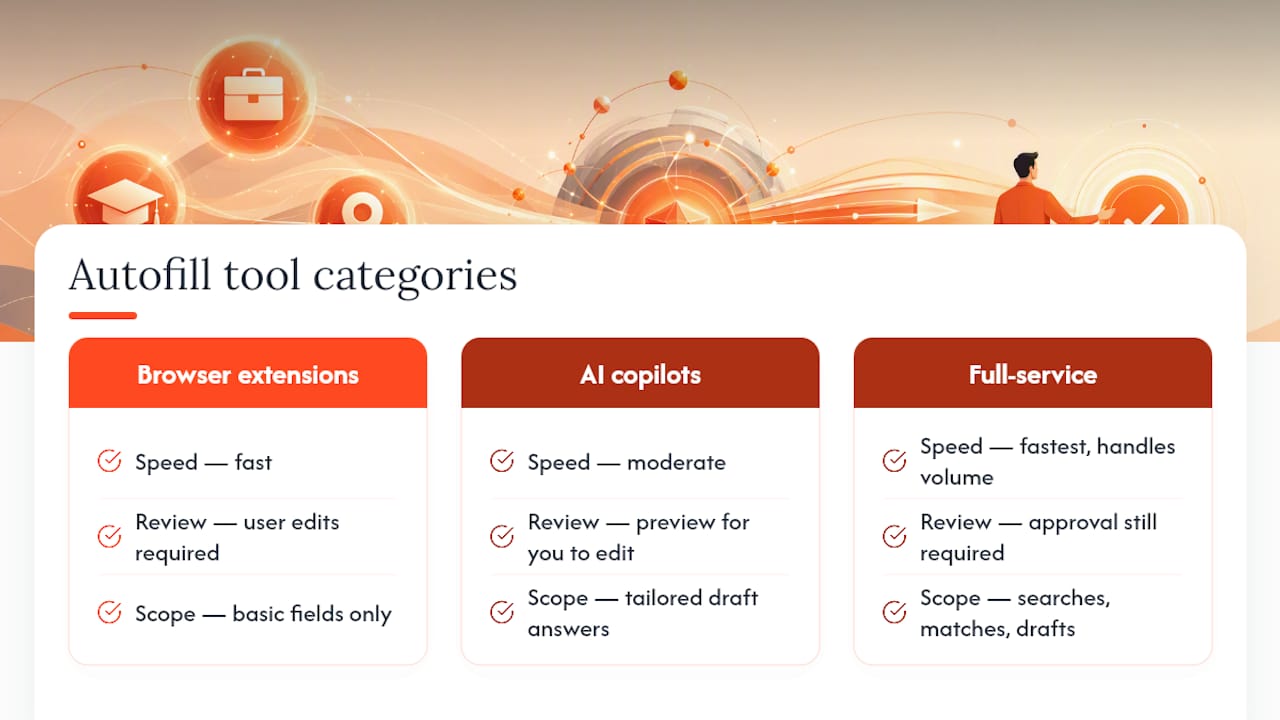
Simple browser extensions focus narrowly on filling standard fields, contact details, work history, education, directly from a stored profile or your uploaded CV. They're fast and usually free or low-cost, but most stop at basic field matching and leave narrative questions entirely to you.
AI-copilot style tools go further, drafting tailored answers to open-ended questions by analysing the job description alongside your background, then presenting a preview for you to edit. This is where semantic matching, comparing the meaning of a job posting to your actual experience rather than just scanning for keywords, starts to add real value over basic field-filling.
Full-service automated platforms extend beyond the form itself, actively searching job boards, matching roles, and managing volume across many platforms rather than one form at a time. Appliqu sits in this category: it searches over 100 job boards, applies semantic matching to judge fit against the whole job description, and drafts CVs and cover letters for each role before you approve sending.
The trade-off across all three tiers is roughly the same: more automation buys more speed, but every added layer needs a corresponding review step if you want the output to stay genuinely tailored rather than generic. The tools worth paying for are the ones that make that review step easy, not the ones that skip it.
Best practices for customising autofill settings by application type
Not every application deserves the same level of automation, and treating them identically is where most of the friction with autofill tools comes from. Matching your settings to the type of role you're applying for keeps quality high without giving up the time savings.
For high-volume, standardised roles, retail, hospitality, logistics, and similar sectors with largely fixed application forms, heavier automation is reasonable. Auto-apply-style speed can work as a supplement in these contexts precisely because the forms rarely vary and the stakes per application are lower.
For targeted professional roles, dial automation back. Keep autofill for contact details and work history, but manually write or closely edit every narrative answer, and always confirm salary and notice period fields rather than trusting a saved default. Senior or specialised positions usually come with unique screening questions that reward a properly tailored response.
For internal or referred applications, consider skipping autofill altogether. These applications are often shorter, more personal, and reviewed by someone who already knows part of your story, so a hand-written response tends to land better than a template done.
A practical rule: set autofill to handle anything factual and repetitive (dates, addresses, qualifications), and reserve manual or AI-assisted drafting for anything that asks you to explain, persuade, or justify. That split keeps the tool doing what it's good at.
What impact do autofill tools have on productivity and outcomes?
The productivity case for autofill is straightforward: fewer repeated keystrokes across multiple job boards means more applications completed in the same amount of time, and less mental fatigue from retyping the same address for the fifteenth time that week. That time saving is real and is the main reason these tools exist.
The outcome case is more nuanced. Speed alone doesn't improve your chances if the applications it produces are generic. Reporting on hiring managers shows real cases where heavy reliance on automated, unreviewed submissions coincided with employer frustration and lower confidence in candidates, because recruiters can often tell when a response wasn't written for their specific role. Quality and tailoring remain the strongest differentiators once an application actually reaches human eyes.
The sensible reading of this is not that autofill hurts your chances, but that autofill without review does. A tool that drafts a tailored answer and lets you check it before sending captures the productivity gain without the generic-application problem. That's the whole argument for an on-approval workflow over a fully unattended one: you keep the hours back, but you don't hand over judgement on what actually gets sent.
Publisher perspective: Appliqu's responsible approach to autofill
Appliqu's semantic matching approach analyses full job descriptions, not just keywords, then drafts a CV and cover letter you can review before anything ships. Explorer stays free permanently, drafting five applications so you can judge the quality first. Sending starts with Core, and every plan, Core, Pro, or Concierge, lets you choose on-approval review or switch to Autopilot once you trust the output. Speed and human judgement were never meant to be opposites.
Alex
How Appliqu helps you autofill securely and get started
Appliqu gives you AI-drafted applications with a genuine choice: review every field before it's sent, or hand off to Autopilot once you're confident in the drafts. That's the difference between this and a blind auto-apply service, you keep the final say, not a black box.
Explorer costs nothing and drafts five applications, so you can see the quality before committing to anything. Sending begins with Core at €29.90 per month for 100 applications, while Pro at €69.90 per month raises that to 300 and adds the Appliqu Job Board. Concierge, at €199.00 per month, includes unlimited applications plus a session with a senior consultant. All prices include 19% VAT. Every tier runs on semantic job matching rather than simple keyword scanning, and every tier lets you decide between on-approval review and Autopilot. If you want to see the plans and pick a starting point, visit the Appliqu pricing page and compare what each tier unlocks against how much of the process you want to hand over.
Sources
- Employers to job seekers: Your AI résumé isn’t fooling anyone | The Seattle Times
- AI auto-apply for jobs: Are these tools worth it in 2026? | Jobscan
- Creating an ATS-friendly resume in 2026: What actually works | Enhancv
FAQ
How do I enable autofill for job applications?
Most browser-extension autofill tools add an icon to your toolbar once installed; you build a profile with your work history and details, then click that icon on any application form to trigger field mapping. Platforms like Appliqu work differently, generating pre-filled applications directly from your profile for you to review inside your account rather than through a browser plug-in.
How do I autofill a job application step by step?
Start by completing your profile fully, including work history, education, and standard eligibility answers, since autofill quality depends entirely on how complete that data is. Open the application, trigger the autofill function, then check every field, especially salary, notice period, and any narrative questions, before submitting.
What does "autofill CV" or "autofill resume" mean?
It means a tool reads your uploaded CV, extracts the text, and uses that data to populate the fields on an application form automatically, rather than you retyping your work history each time. The extraction step is the same process ATS software uses to parse a CV, which is why selectable, well-structured CV text matters for both.
Is autofill with a CV actually good, or risky?
Autofill with your CV is a solid time-saver when you review the pre-filled fields before submitting, since the CV feeds accurate work history and dates automatically. It becomes risky only when paired with unattended auto-apply, where nothing gets checked and generic, unreviewed submissions can leave a poor impression on hiring managers.
Does Appliqu use autofill or full auto-apply?
Appliqu offers both an on-approval mode, where you review every drafted application before it's sent, and an Autopilot mode for once you trust the output. Sending is available from the Core plan at €29.90 per month, with current details and plan comparisons listed on the Appliqu website.