Beat the 75% Filter: ATS Resume Optimization That Gets You Interviewed

The single highest-impact move is tailoring your resume to each job description with exact hard-skill keywords placed in your summary, skills section, and current-role bullets. Every application then has to clear three gates: parsing, keyword match, and formatting. Use a single-column DOCX (or text-based PDF), strip out header and footer contact fields, and match the job posting's language before you click submit.
TL;DR:
- Tailor your resume to each job by inserting the top five hard-skill keywords into your summary, skills section, and current-role bullets; avoid soft skills and vague phrases.
- Use a single-column DOCX format with standardized MM/YYYY dates, removing headers, footers, images, and tables to improve parsing accuracy in applicant tracking systems.
- Complete every detail in the online application form, including redundant fields, since structured data can weigh as heavily as your resume in ATS filters.
- Maintain a keyword density of around 20-35 percent for your top terms and avoid keyword stuffing to prevent triggering the system's anti-spam detection.
- Use AI or semantic matching tools to automate resume tailoring, but always verify content authenticity and ensure your bullets can be confidently defended in an interview.
Table of Contents
- Why ATS Resume Optimization Matters More Than You Think
- Quick ATS-Friendly Checklist Before You Apply
- Keyword Research and Placement: What to Pull From a Job Posting
- Formatting and Parsing Pitfalls That Cause Automatic Drops
- File Types, Uploads, and Filling Out Application Forms Correctly
- ATS Checkers and What Your Score Actually Means
- Scaling Tailoring Without Faking Your Skills
- Compliance vs. Readability: Where to Draw the Line
- Let Appliqu Handle the Repetitive Part of the Job Search
- Sources
- FAQ
Why ATS Resume Optimization Matters More Than You Think
Ninety percent of Fortune 500 companies run resumes through an Applicant Tracking System before a human ever opens the file, and roughly 75% of candidates get filtered out during that screening stage. That is not a small filter. It's the majority of the funnel.
They're losing because the parser can't read their resume layout, or their keywords don't mirror the job description closely enough for the matching algorithm to flag them as relevant. ATS resume optimization is the practice of closing that gap. It's not about gaming a robot. It's about presenting your actual experience in a format the software can extract and score accurately, and using the vocabulary the job posting already told you to use.
Quick ATS-Friendly Checklist Before You Apply
Run through these steps in order. Each one takes a few minutes, and skipping any of them tends to be exactly where good candidates lose points.
- Pull the top 5 hard-skill keywords from the job posting. Look for tools, certifications, and role-specific nouns (not soft skills like "team player"). Place them in your summary, your skills list, and at least one bullet under your current or most recent job.
- Convert your file to a single-column DOCX. Remove any header or footer content, since many parsers skip those fields entirely. Standardize every date to MM/YYYY format.
- Run the resume through an ATS checker. Fix the top three flagged issues (usually parsing errors or missing keywords), then complete every field in the online application form, even the ones that feel redundant with your uploaded resume.
That third step matters more than people assume. Recruiters and the systems behind them often weight the structured form fields (job title, skills, years of experience) as heavily as the resume file itself, so leaving fields blank because "it's already on my resume" can cost you a match score you'd otherwise get for free.
Pro Tip: Keep a master version of your resume with every keyword variant you've used across applications. When a new posting uses a term you've seen before, you can copy the exact phrasing instead of reinventing it each time.
Keyword Research and Placement: What to Pull From a Job Posting
Read the job description twice before you write anything. The first pass is for comprehension. The second pass is where you extract raw material: hard-skill nouns, certifications, software names, and any phrase the employer repeats. If "stakeholder management" appears three times and "cross-functional collaboration" appears once, that frequency difference is a signal about what the ATS is weighted to detect, and what a hiring manager cares about most.
Once you have your list, sort it by how often each term appears and how central it seems to the role. Then place the top candidates deliberately:
- Summary (top of resume): Work in 2 to 3 of your highest-weight keywords in the first two sentences. This is often the first text block a parser reads and the first thing a recruiter skims.
- Skills section: Build a clean, structured list of hard skills, tools, and certifications, mirroring the exact phrasing from the posting where it's honest to do so.
- Current-role bullets: Don't just name-drop a skill. Pair it with evidence. "Managed Salesforce CRM migration for 40,000 contact records" beats "Experienced with Salesforce" on every metric that matters.
A dedicated skills section pulls double duty. Because ATS platforms often parse it as both a structured field and part of the full-text search, a well-built skills section can add 10 to 15 points to your match score compared to burying the same terms only in prose.
By the numbers: Practitioners auditing resumes recommend including a set of hard-skill keywords pulled directly from the job description, placing top terms in your opening summary, and ensuring your current-role bullets carry multiple JD keywords apiece to hit a strong match rate.
Frequency guidance matters here too. In practice, aim for something like 20 to 35 percent density across your counted key terms relative to how often they show up in the posting itself, mirroring the employer's own signal strength rather than repeating a term five times because you assume more is better. Exceeding that keyword density range may trigger a keyword stuffing flag and reduce your score.
Modern ATS platforms and applicant portals used by companies like those built on Lever or Greenhouse are increasingly good at detecting abnormal keyword density, and an unnaturally repetitive resume can score worse than a moderately optimized one. If a term feels forced when you read it aloud, it will read as forced to the algorithm too. Write for a human first, then confirm the machine can find what you wrote.
Formatting and Parsing Pitfalls That Cause Automatic Drops
Sidebars, tables, text boxes, and header or footer placement are the most common reasons a resume fails to parse cleanly, even when the content itself is strong. Most ATS parsers read left to right, top to bottom, in a single linear stream. Anything that breaks that stream, like a two-column layout with your skills in a sidebar, risks being scrambled or dropped entirely.

Images cause the same problem. A logo, a headshot, or a skills chart rendered as a graphic contains zero extractable text. If your name and contact information live inside a header field rather than the body of the document, some parsers never see them, and your application can get flagged as missing basic identifying data before it's ever reviewed.
Fix these issues with a short set of structural rules:
- Use a single-column layout for the entire document, top to bottom, no side panels.
- Avoid tables, text boxes, and inserted images, including decorative icons next to section headings.
- Standardize your section headings to plain terms parsers expect: "Work Experience," "Education," "Skills," and "Certifications" rather than creative alternatives like "My Journey" or "What I Bring."
- Unify your date format as MM/YYYY throughout (03/2023 to present, not "March 2023 to Now").
- Place your name, phone number, and email in the first two lines of the document body, not in a header or footer field.
On fonts and spacing, stick to something parsers and humans both handle well: Calibri, Arial, or Georgia at 10 to 12 point size, with margins between 0.5 and 1 inch. Wide margins and generous line spacing don't hurt your ATS score, and they make the document easier for a recruiter to skim once it clears the system.
Pro Tip: Open your resume in a plain text editor (Notepad or TextEdit) after formatting it. If the content reads in a garbled or reordered sequence, that's roughly what an ATS parser sees too.
Removing header and footer contact fields entirely and putting that information directly in the top lines of the document is one of the simplest fixes with an outsized effect on parse completeness. It costs you nothing stylistically and can be the difference between a complete parsed profile and one with missing required fields.
File Types, Uploads, and Filling Out Application Forms Correctly
DOCX should be your default file format for almost every application. It's the format ATS platforms are built to parse most reliably, since it preserves text as text rather than converting it into an image layer. A text-based PDF (one created directly from a word processor, not scanned) is acceptable when a job posting specifically requests PDF, but treat DOCX as the safer default when you have a choice.
Never submit a scanned or image-based PDF. If you can't highlight and copy individual words from the file on your own computer, an ATS almost certainly can't extract meaningful text from it either, which means your entire resume could register as blank.
A few upload habits make a measurable difference:
- Default to DOCX unless the posting explicitly asks for PDF.
- Keep contact information in plain text at the top of the document, never inside a header, footer, or embedded image.
- Use plain text hyperlinks for your LinkedIn profile or portfolio rather than embedded objects or shortened link images.
- Name your file clearly, such as "FirstName_LastName_Resume.docx," since some systems parse filenames into candidate records.
- Fill out every online form field, even ones that duplicate your resume content, and paste role-specific keywords into free-text fields when the application allows it.
That last habit gets skipped constantly, and it shouldn't. Many portals score the structured form data with the same weight as the uploaded file, sometimes more, because structured fields are easier for the system to parse without error. A resume that's flawless but paired with three blank form fields can still underperform a mediocre resume attached to a fully completed application.
ATS Checkers and What Your Score Actually Means
Most resume checkers combine two separate evaluations into one composite score: a parse-rate check (can the system extract your sections, dates, and contact details correctly?) and a keyword-match percentage against the job description. Tools built this way, including checkers that run 20 to 27 individual compatibility and content checks, are trying to approximate what an enterprise ATS will actually do with your file.
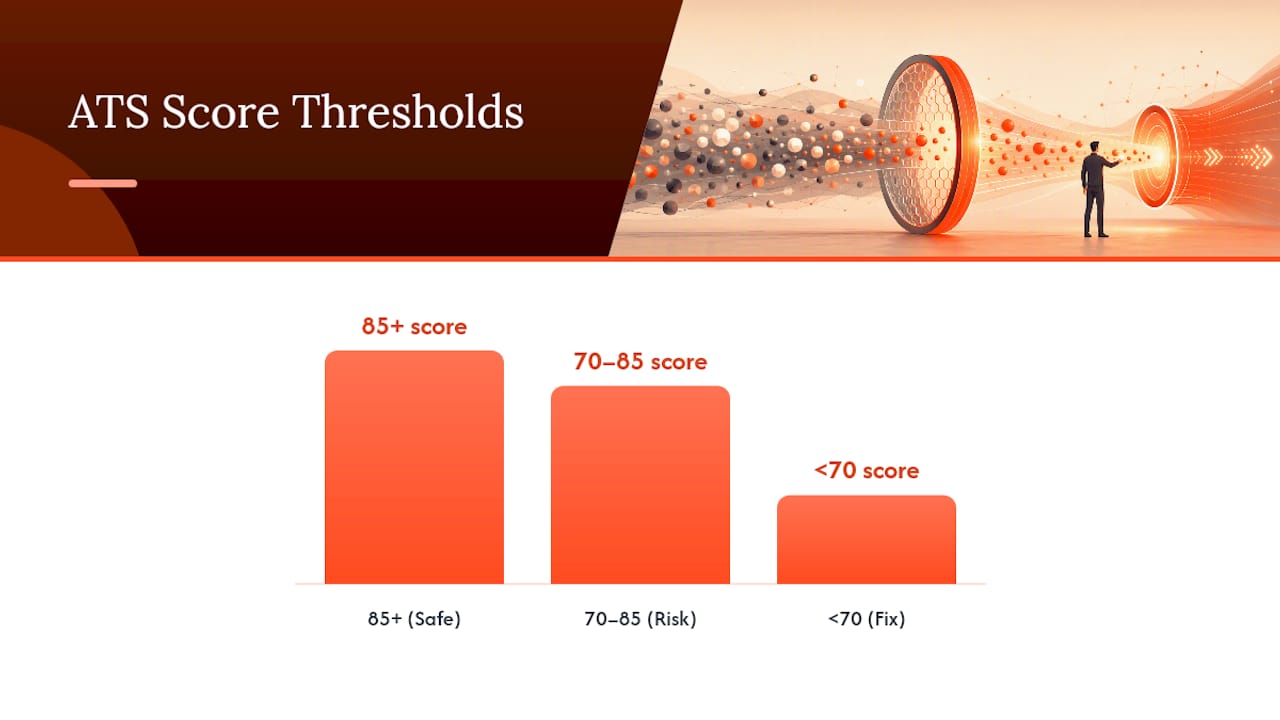
As a rough benchmark, a score of 85 or above generally indicates a resume that will parse cleanly and match well on the keywords the tool tracked. Scores between 70 and 85 usually mean the resume is at real risk. It might pass some systems and get quietly dropped by stricter ones. Anything meaningfully below 70 signals a structural or keyword problem worth fixing before you submit anywhere.
Platform matters here too. Enterprise systems like Workday, Taleo, and SAP SuccessFactors tend to enforce stricter parsing rules and lower tolerance for formatting quirks, while platforms like Lever and Greenhouse are generally more forgiving of minor structural deviations. If you're applying to a large corporation, assume you're being screened by the strictest common denominator and format accordingly, even if the job posting doesn't tell you which system the company uses.
The most efficient workflow treats an ATS checker as a loop, not a one-time pass:
- Run the checker first to get a baseline parse rate and keyword match percentage.
- Fix parsing issues before anything else. Missing sections or garbled dates cost more score than a slightly thin keyword list.
- Add the top missing keywords the tool flags, placed naturally in your summary or bullets.
- Re-run the check to confirm the fixes actually moved the score rather than assuming they did.
Prioritizing parsing and required-section completeness before tweaking word choice or fonts tends to produce larger score gains than cosmetic edits, and it's the order most audits recommend working through. Appliqu's free ATS resume checker runs this same kind of parse-and-match evaluation if you want a first read before you start editing.
Scaling Tailoring Without Faking Your Skills
Rewriting your resume for every single job posting by hand is exhausting, and it's exactly why so many qualified candidates apply to fewer roles than they should. The honest fix isn't skipping tailoring. It's automating the mechanical parts of it while keeping a hard rule in place: every keyword on your resume has to be something you can speak to confidently in an interview.

Semantic matching is the better approach here, and it's different from naive keyword stuffing. Instead of scanning a job posting for terms and jamming them in wherever they fit, semantic matching analyzes the full context and intent of a job description, connecting it to related experience you already have even when the wording doesn't match exactly. If a posting asks for "data-driven decision making" and your background is in "using analytics to inform product roadmaps," a semantic approach recognizes those as the same underlying capability, whereas a naive keyword scan might miss the connection entirely.
Safe automation follows a few consistent rules regardless of which tool does the work:
- Synthesize the job description's actual language, not a generic template of "relevant" terms pulled from unrelated postings.
- Keep a finite truth check on every claim. If you can't explain a listed skill in a follow-up interview with specific examples, it doesn't belong on the resume, automated or not.
- Preserve evidence in your bullets. Automation should adjust phrasing and emphasis, not replace your actual accomplishments with vague, keyword-heavy filler.
Pro Tip: Before submitting an automated or AI-assisted resume, read your top three bullets out loud and ask yourself if you could defend each one for two minutes straight in an interview. If you can't, edit it before you send it.
This is the space Appliqu was built for. Its semantic matching approach reads the full job description rather than scanning for isolated keywords, which is meant to surface roles and tailor documents based on actual fit rather than superficial term overlap. The platform's internal findings suggest that AI-assisted tailoring can meaningfully raise interview rates compared to sending the same generic resume to every posting, which tracks with what the three-gate framework predicts: a resume that matches on parsing, keywords, and formatting simultaneously should outperform one that only gets one of the three right.
If you're using AI tools to help with tailoring, it's worth understanding how recruiters actually detect AI-generated content before you lean on it heavily. The safest use of automation augments your real experience. It doesn't invent a version of you that doesn't exist.
Compliance vs. Readability: Where to Draw the Line
Chasing a perfect ATS score can quietly wreck the human read that comes after it, and that trade-off is where most advice online gets sloppy. My rule of thumb: for enterprise roles applying through Workday, Taleo, or similar systems, secure parsing and keyword match first, because you don't get a second chance if the system drops you before a recruiter ever opens the file. Once you've cleared that bar, optimize the layout for a fast human skim; whitespace, clear hierarchy, quantified bullets.
Test for both, don't assume one guarantees the other. Run your resume through an ATS checker for the parse and keyword numbers, then hand it to a peer for an unscripted two to three minute read. If they can't tell you your last two roles and one standout accomplishment after that quick read, the ATS score isn't buying you anything downstream.
There's one exception worth naming: if you're applying to a small company that's likely screening applications by hand rather than running them through a formal system, shift the priority. Clarity and impact matter more than keyword density in that context, since there's no parser to satisfy in the first place. Reading the room on company size is part of the skill, not an afterthought.
Alex
Let Appliqu Handle the Repetitive Part of the Job Search
Appliqu is built for exactly the grind this article just walked through: pulling keywords, tailoring bullets, reformatting files, and repeating that process for every single posting. Instead of you doing that manually for each application, Appliqu's semantic matching scans over 100 job boards, reads full job descriptions rather than isolated keywords, and generates tailored resumes and cover letters automatically, then submits them around the clock.
If you're a time-constrained applicant sending out dozens of applications a week, a career changer trying to translate old experience into new industry language, or a high-volume job seeker who's tired of rewriting the same resume forty different ways, this is the kind of workload the platform was designed to absorb. It also runs ATS CV analysis and live application tracking, so you're not left wondering which resume version went where or why a particular application stalled.
Start with the free ATS resume checker to see where your current resume stands, then explore Appliqu's automated job application platform to see how tailored, ATS-optimized applications go out without you rewriting a single bullet by hand.
Sources
- Optimizing Your Resume for Applicant Tracking Systems | Columbia Career Education
- What Is an ATS-Compliant Resume? The 3-Gate Audit (2026) | Resume Optimizer Pro
- Resume Keywords: Find, Place & Use Them (2026) | ATSFixer Blog
- Free ATS Resume Checker | AI Resume Checking Toolset | Enhancv
FAQ
How Can I Optimize My Resume for ATS?
Extract the top hard-skill keywords from the job description, place them in your summary, skills section, and current-role bullets, then convert your file to a single-column DOCX with standardized MM/YYYY dates and no header or footer contact fields.
Can ChatGPT Make an ATS-Friendly Resume?
General AI chat tools can help draft bullet points and suggest keywords, but they don't verify formatting compatibility or run a parse check, so pairing that draft with an ATS checker or a purpose-built tool like Appliqu's free CV checker closes the gap.
How Do I Get a 90+ ATS Score?
Combine complete, error-free parsing (correct section headings, no tables or images, contact info in the body text) with a strong keyword match that mirrors the job description's top five to eight hard skills, then re-run a checker to confirm both are working together.