6-12 Keywords From the Job Ad, Verify Your German CV Parses on ATS

Mirror the six to twelve most role-relevant keywords from the job advert, weave them naturally through your summary, skills and experience bullets, then verify with a parser to confirm they've been captured correctly. That last step matters most: a CV can look perfect on screen and still lose its keywords the moment an applicant tracking system parses it into structured fields. Get the words right and the format right, and you've done the two things that actually move a CV forward.
TL;DR:
- Prioritize including role-specific titles, six to twelve key hard skills or tools, and relevant certifications directly from the job advert to improve ATS parsing.
- Use a single-column, simple format with standard headings, avoid graphics and tables, and place contact details in the main body for reliable ATS recognition.
- Extract keywords by highlighting repeat terms in the advert, grouping them by type, and only including those you can genuinely back with experience, not fluff or vague keywords.
- Place your target keywords at the top of your CV's summary and skills section, and prove them in experience bullets with actions, tools, and outcomes for better human and parser recognition.
- Use dedicated tools like Appliqu to automate and verify the tailoring process, ensuring your keywords survive the parsing step before submitting applications.
Table of Contents
- What counts as an ATS keyword and why it matters
- How does an ATS actually read your CV?
- Which keyword types should you prioritise for one application?
- How do you extract keywords from a job description?
- Where should keywords go on your CV?
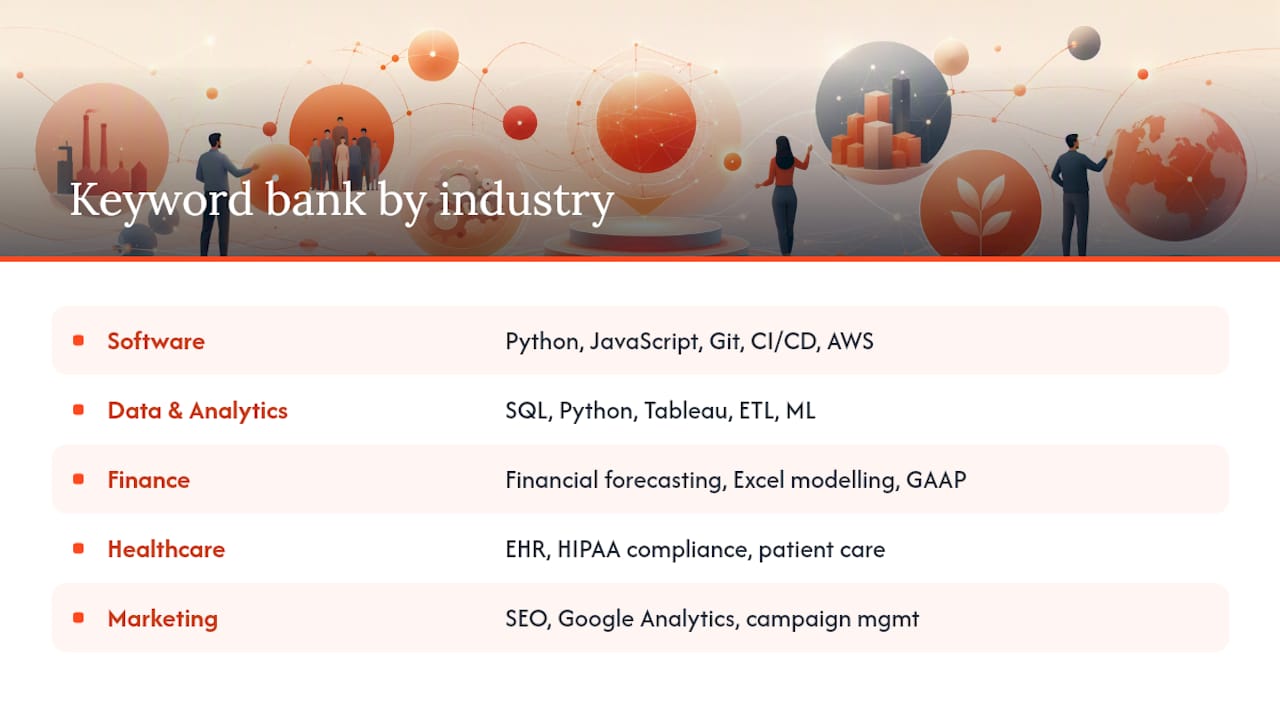
- A practical keyword bank by industry and role
- How do you verify your CV parses correctly?
- Appliqu and author expertise: how this guidance was informed
- When to tailor deeply and when to reuse a base CV
- Automate the tailoring and verification with Appliqu
- Sources
- FAQ
What counts as an ATS keyword and why it matters
An ATS keyword isn't just a buzzword lifted from a job advert. It falls into one of six categories: role titles ("Financial Controller", "DevOps Engineer"), tools and systems (SAP, Salesforce, Python), methods and frameworks (Agile, Six Sigma, GAAP), certifications (PRINCE2, CFA, PMP), deliverables and outcomes (budget forecasting, campaign reporting), and soft skills, but only when backed by evidence rather than stated on their own.
Recruiters using an applicant tracking system often run Boolean or phrase searches against parsed CV fields to shortlist candidates, according to Factorial's guide to applicant tracking systems. That means presence matters, but so does context: a keyword sitting in a job title carries more weight than one buried in a hobbies section.
Repetition has diminishing returns. Mentioning "stakeholder management" once in your summary and once in a relevant bullet does more than repeating it five times in a skills list. Practical guidance from recruiter-focused ATS resources recommends including the top 6 to 12 role-relevant skills from the advert and mentioning each naturally, rather than cramming a single term in repeatedly.
A quick breakdown of what to look for:
- Role titles: the exact job title and close variants used in the advert
- Hard skills and tools: named software, platforms, languages, or equipment
- Methods and frameworks: named methodologies your industry recognises
- Certifications: qualifications explicitly listed as required or desirable
- Deliverables: outcomes and responsibilities phrased as concrete actions
- Soft skills as evidence: only when tied to a result, never as a standalone list
Avoid white text, hidden sections, or keyword walls in invisible font. These gimmicks are detectable and often work against you, since recruiter commentary notes that visible attempts to game a parser tend to backfire rather than help.
How does an ATS actually read your CV?
An ATS is fundamentally a database and workflow tool. It parses your uploaded document into structured fields, filing your name, contact details, employment dates, job titles and skills into predefined slots, then makes those fields searchable for recruiters. It doesn't "reject" you for weak content in the way many job seekers assume.
The failures happen at the parsing stage, not the judgement stage. Two-column layouts, tables, text boxes, headers and footers, and graphics all commonly scramble content or hide it from the parser entirely, according to Gorizzume's breakdown of ATS behaviour. Your contact details sitting in a header might never reach the "contact" field at all. A skills table with merged cells might dump every entry into a single unreadable string.
Certain formatting choices parse reliably almost everywhere:
- Use a single-column layout from top to bottom.
- Stick to standard section headings ("Work Experience", "Education", "Skills", "Certifications") rather than creative alternatives like "My Journey" or "What I Bring".
- Put your name and contact details in the main body, never in a header or footer.
- Use simple bullet points rather than tables or text boxes for experience entries.
- Save as .docx or a text-based PDF, since image-based PDFs and scanned documents often can't be parsed at all.
- Keep dates on the same line as the job title, so parsers correctly associate them with the right role.
Pro Tip: If your parsed output separates a job title from its dates, or drops an employer name entirely, simplify that entry into a plain paragraph with the date on the same line as the title. This single fix resolves most parsing detachment issues on retesting.
Quick pre-format checklist before you write a single bullet:
- No columns, text boxes, or tables anywhere in the document
- No graphics, icons, or photos carrying information the parser needs
- Standard, recognisable section headings throughout
- Contact information in the body, not a header or footer
Getting the format right is the unglamorous half of ATS resume optimisation, but it's the half that decides whether your carefully chosen keywords ever reach a recruiter's search results in the first place.
Which keyword types should you prioritise for one application?
Not every keyword deserves equal space, and tailoring time is limited. For a single application, work through this priority order:
- Title and seniority: match the advert's job title and level as closely as your actual experience allows.
- Essential hard skills and tools: the named software, platforms, or technical competencies listed as required.
- Certifications: anything explicitly required or preferred, stated exactly as written.
- Methods and frameworks: named methodologies that signal you know how the role actually operates.
- Deliverables: the outcomes and responsibilities the advert describes, rephrased into your own experience.
- Soft skills as evidence: only where you can attach a concrete example, never as a bare adjective list.
For counts, aim for six to twelve hard skills or tools drawn from the advert, three to five methods or deliverables, and two to four soft skills tied to evidence. That range keeps you comprehensive without tipping into keyword stuffing, and it matches the recommendation for ATS CV optimisation built around this exact bracket.
Synonyms deserve attention too. An advert asking for "customer relationship management" might reward a CV that also says "CRM", since Boolean and phrase-based searches don't always catch both forms automatically. Including the advert's exact phrase plus one common variant helps you match both keyword based and NLP-based searches, covering systems that search literally and those that interpret meaning. This matters more for German-language applications too: a Stellenanzeige might use "Personalwesen" where an English CV would say "HR", so mirror whichever language and phrasing the advert itself uses.
How do you extract keywords from a job description?
Building a keyword bank from a single job advert takes ten to twenty minutes once you know the sequence. Here's the repeatable version:
- Copy the full job description into a plain document. Strip formatting so you're reading text, not layout.
- Highlight every phrase that repeats. Terms appearing two or three times across the advert, especially in both the "responsibilities" and "requirements" sections, are almost always genuine priorities.
- Separate essential from desirable. Adverts usually signal this with headings like "Essential Criteria" versus "Desirable" or through phrasing: "must have" versus "nice to have".
- Group what's left by type. Sort into role title, tools, methods, certifications, deliverables and soft skills so you can see at a glance what you're missing from your existing CV.
- Cross-check against your own experience. Only keep terms you can honestly back with a real example. Never add a certification or tool you don't actually hold.
A few heuristics speed this up considerably. Lines near the top of the "requirements" section tend to carry more weight than those buried at the bottom. Repeated tools or systems named more than once across the advert are near-certain to be searched for by recruiters. And job titles used in the advert's own heading, not just the body text, are worth mirroring exactly, since that's often the first field a Boolean search checks.
Pro Tip: Keep a running keyword bank per role type (three "Marketing Manager" adverts, for instance) rather than starting fresh each time. After two or three job descriptions in the same category, you'll notice the same 15 to 20 terms resurfacing, which becomes your reusable base for that role family.
For volume applications, a shortcut works well: build one master keyword bank per role type, then spend five minutes per application swapping in the two or three terms unique to that specific advert rather than rebuilding the whole list. Save deep, full-extraction tailoring for roles you genuinely want, and reserve the shortcut for adverts you're applying to at volume. This is also where automated matching starts to earn its place. Appliqu reads the full job posting for you and applies semantic matching, which is worth knowing about before you decide how much of this extraction to do by hand for every single role.
Where should keywords go on your CV?
Placement decides whether a keyword gets noticed by a human reviewer, not just captured by the parser. Work through the CV in this order:
- Professional summary (top third of the page): pack in your target title, two or three headline tools, and one standout deliverable. Recruiters weight the first 30% of a CV heavily, so your strongest keywords belong here, not buried on page two.
- Dedicated skills section: list 8 to 15 items, mixing tools, methods and certifications, since a section this size improves visibility for both parsers and human scanners without reading as an exhaustive dump.
- Experience bullets: this is where you prove a keyword rather than just naming it.
- Certifications and education: state qualifications exactly as the advert phrases them, including acronyms.
The proof pattern that works best for experience bullets follows a simple structure: action, tool, result. For example: "Implemented Salesforce CRM migration across three regional teams, reducing manual data entry by cutting duplicate records." Naming the tool alone tells a parser you've used it. Naming the tool alongside a concrete outcome tells a human reviewer you were good at it.
Skip gimmicks in the skills section. Star ratings, progress bars, and skill-level graphics look polished on screen but often confuse a parser and add nothing a human reviewer needs. A plain, comma-separated or bulleted list of terms outperforms a decorative one every time it's actually processed by software.
A practical keyword bank by industry and role
Copy the group closest to your target role, then strip anything you can't honestly back with real experience. Each list mixes tools, methods, deliverables and certifications so you can see the type at a glance.
Software development: Python, Java, JavaScript, React, Git, CI/CD, Agile (method), Scrum (method), API integration, unit testing, cloud deployment (AWS/Azure), code review, sprint planning (method), technical documentation, system architecture, microservices, DevOps
Data and analytics: SQL, Python, Tableau, Power BI, data visualisation, statistical modelling (method), ETL pipelines, machine learning, A/B testing (method), data governance, predictive analytics, Excel (advanced), dashboard reporting (deliverable), data cleansing, KPI tracking (deliverable)
Finance and accounting: financial forecasting (deliverable), budget management, GAAP (method), IFRS (method), variance analysis, SAP, Excel modelling, reconciliation, audit preparation, cash flow analysis, ACCA (certification), CFA (certification), regulatory compliance, month-end close (deliverable)
Healthcare and clinical: patient care coordination, clinical documentation, HIPAA compliance (method), electronic health records (EHR), care planning (deliverable), CPR certification, medication administration, multidisciplinary teamwork, patient safety protocols, clinical assessment, NHS pathways
Sales: pipeline management, Salesforce, CRM, lead generation, quota attainment (deliverable), consultative selling (method), account management, contract negotiation, sales forecasting, cold outreach, territory management, upselling
Marketing: SEO, content strategy, Google Analytics, campaign management (deliverable), email marketing, social media strategy, HubSpot, brand positioning, A/B testing (method), conversion rate optimisation, marketing automation, paid media (PPC)
Human resources: talent acquisition, onboarding (deliverable), HRIS (Workday/SAP SuccessFactors), employee relations, performance management (method), payroll administration, CIPD (certification), diversity and inclusion initiatives, policy development, compensation benchmarking
Project management: PRINCE2 (certification), PMP (certification), Agile (method), Scrum (method), stakeholder management, risk mitigation (deliverable), Gantt charts, resource allocation, budget tracking, project delivery, Jira, change management
Adapt every list to what the advert actually says. A keyword bank only earns its place on your CV once you've matched it against a real job description, not before.
How do you verify your CV parses correctly?
Every other step in this guide is worthless if the keywords you chose never survive the parser. Run this check before sending any tailored CV:
- Upload your CV to an ATS-style checker. A dedicated CV checker will show you exactly what a parser extracts.
- Inspect the parsed fields. Look specifically at name, contact details, employment dates, job titles, and skills.
- Compare the parsed output against your original document. Anything missing, garbled, or misfiled tells you where formatting broke down.
- Fix and retest. If a job title detached from its dates, simplify that entry. If a skill vanished, check whether it was sitting in a table, graphic, or unusual heading.
Common fixes at this stage are almost always structural rather than content related. Detached dates usually mean the job title and date weren't on the same line. Missing skills usually mean they were listed inside a graphic or table cell rather than plain text. A blank contact field usually means those details were sitting in a header the parser skipped entirely.
A short pre-send checklist:
- All keywords from your bank appear in the parsed skills or experience fields
- Job titles and dates stayed correctly paired
- Contact details appear in the parsed output, not just visually on the page
- No garbled text, merged fields, or dropped sections anywhere in the parse result
Multiple practical guides for ATS-friendly CVs treat this self-parsing check as the mandatory last step before sending, and for good reason: it's the only way to know your tailoring actually worked rather than assuming it did.
Appliqu and author expertise: how this guidance was informed
This guidance was compiled by Alex, a contributor at Appliqu, drawing on published ATS parsing behaviour and recruiter-facing optimisation guides rather than a single proprietary study. Where a specific claim needed backing, it carries a link to its source rather than a vague appeal to "research".
Appliqu's own stated approach is relevant here because it complements manual keyword work rather than replacing it. Appliqu reads the full job posting and applies semantic matching to tailor CVs and cover letters, rather than scanning for isolated keywords alone, which aligns with broader industry commentary that newer systems increasingly weigh context alongside literal keyword presence. For readers wanting the mechanics behind that approach, Appliqu's guide on whether AI can tailor a CV for every application goes into more detail.
Automation of this kind scales the tailoring workload, but it doesn't remove the need for verification. Every keyword still needs to be true, and every parsed CV still needs a check before it goes out. That combination, semantic tailoring plus manual proof, is the honest limit of what automation solves here.
When to tailor deeply and when to reuse a base CV
Not every application deserves the full extraction workflow. For roles you genuinely want, at organisations you've researched, invest the full ten to twenty minutes: pull the keyword bank, place terms deliberately, verify the parse. For volume applications to similar roles, a well-built base CV with swapped-in specifics does nearly as well, provided the core keyword bank for that role family is already solid.
Appliqu fits both patterns, not just one. Used on approval, it functions like a careful manual tailor, applying semantic matching to each posting while keeping you in control of what gets sent. Switched to Autopilot, it suits the volume side of the equation, handling bulk applications while you focus your own attention on the roles that matter most.
One caution worth stating plainly: don't chase a parser "score" as if it were the goal. A CV can score well on a checker and still fail with a human reviewer if the keywords aren't backed by real evidence, and a CV can score modestly while still landing an interview because the substance is genuinely strong. Treat the score as a diagnostic, not a target.
Alex
Automate the tailoring and verification with Appliqu
Appliqu is the alternative to manually rebuilding your keyword bank for every application: it reads the full job posting, applies semantic matching to tailor your CV and cover letter, and keeps you in control of what actually gets sent.
Where you start depends on how much of this process you want to hand over. The Explorer plan is a permanent free tier, and Appliqu writes 5 applications on it, useful for testing how the tailoring reads before committing to anything. Sending applications starts with the Core plan and paid plans begin at 29.90 EUR per month for 100 applications, aimed at anyone moving from occasional tailoring to steady volume. The Pro plan, at a higher tier, includes access to a curated feed of matched roles alongside the automation. The Concierge premium plan covers unlimited applications plus a session with a senior consultant, suited to job seekers who want expert input on top of automated tailoring.
Every plan runs in either "on approval" mode, where you review each tailored application before it goes out, or Autopilot, where Appliqu handles submission end to end. If you've just built your first keyword bank using the steps above, the natural next move is to see how that same tailoring looks when Appliqu applies it automatically. Visit Appliqu to compare plans and see which one matches how much control you want to keep.
Sources
FAQ
What ATS keywords should I include on my resume?
Include the role title, six to twelve essential hard skills or tools named in the advert, any required certifications, and two to four soft skills backed by a concrete example. Draw every term directly from the job description rather than a generic list, since role-relevant keywords from the actual advert matter more than industry buzzwords.
What are good keywords for a resume?
Good keywords mirror the exact language the employer used for tools, methods, certifications and the job title itself. A "good" keyword is one you can prove with a real example in your experience section, not just list, since presence without evidence carries little weight with human reviewers even when a parser captures it correctly.
How do I find keywords for ATS optimisation?
Copy the job description into a plain document, highlight phrases that repeat across the responsibilities and requirements sections, then sort them into role title, tools, certifications and deliverables. Cross-check the resulting list against your own experience and keep only what you can honestly back.
Is a 73% ATS score good?
Treat any parser score as a rough diagnostic rather than a pass or fail mark, since scoring methods vary between checkers and no single number is universally standard. Some scoring results likely signal room to add a few more matched keywords or fix a formatting issue, so run your CV through a CV checker, inspect which fields are missing, and address those directly rather than chasing the number itself.
How much does Appliqu cost?
Appliqu's Explorer tier is permanently free and writes 5 applications. Paid sending starts with Core at one of the paid plans starts at 29.90 EUR per month for 100 applications, with Pro at a higher tier plan is priced at 69.90 EUR per month for 300 applications plus the Appliqu Job Board, and Concierge at a premium plan costs 199 EUR per month for unlimited applications plus a senior consultant session, all prices including 19% VAT.